Labels

Showing posts with label Media Player. Show all posts

2012/11/20

Best (Free) HTML5 Video Players

HTML5 video may have been the new standard way to show video on the web without plugins, simply by embedding to web browsers. As HTML5 being increasingly popular and compatible with various devices, HTML5 video player enables your blog or website page launching with videos. Let’s see a collection of some best free ones available.

HTML5 video player

1. Flowplayer
It is an Open Source video player for your website. There are at least 3 skins for your options to beautify and diversify your websites. You can embed it to your website without an IFRAME. HTML5 comes first while Flash second. Very well documented, clean look and easy to implement. Great playlist feature and lots of active development are all displayed in this HTML5 video player.

2. JW Player
With HTML5 and Flash Dual Mode JW Player, you’d never worry about your video be the wrong formats. Beautiful skins, live and on-demand adaptive streaming support, single-click sharing to Facebook and Twitter, all these features forms this nice HTML5 video player.

3. MediaElement.js
There are also 3 different skins for your choice. It can be perfectly used as Plugins for Wordpress, Drupal, Joomla, jQuery, and BlogEngine.NET, ruby gem, plone. It allows HTML5 audio and video players in pure HTML and CSS.

4. Projekktor
It is a free, open source (GPL) HTML5 based video player written in Javascript. It solves cross browser and compatibility issues, adds eye candy and provides extremely powerful nonstandard features. It supports full screen, playlists, Flash fallback and pre/post roll ads to generate revenue from your videos.

5. Daily Motion HTML5 Video Player
The HTML5 video player from world’s second largest video sharing website, HTML5 makes all sorts nifty effects and gadgets possible. Firefox, Chrome, IE 9, Opera, Safari, all modern browsers are supported by it.

6. YouTube HTML5 Video Player
From world’s largest video sharing website, this is an opt-in trial of HTML5 video on YouTube. If you are using a supported browser, you can choose to use the HTML5 player instead of the Flash player for most videos. It supports various browsers.

7. Viemo HTML5 Video Player
Well, this HTML3 video player comes from another video sharing website. It comes as a beta test version actually. To enable the HTML5 player, click the "Switch to HTML5 player" link below any video.

8. OSM Player
Open Standard Media Player is an all-in-one media player for the web display video of any type of web media, including HTML5, Flash and third party media solutions of YouTube and Vimeo. There is playlist for your player and for YouTube.

9. FlareVideo HTML5 Player
It is completely open source and free for commercial use. This HTML5 video player supports HTML5 video with Flash fallback. It is featured of easy CSS/HTML/JS customization and theming; full screen support. There are 3 optional themes for your reference.

2012/11/18

Is Free VLC Back for i-Devices to Hit App Store?

Are you still missing the missing VLC media player for iPhone, iPad and iPod since it has been pulled down from the app store due to licensing issues?

VLC for iPhone-VLC App
Roughly two years ago, shortly after its release on App Store, Apple decided to remove it from the store. If you are not lucky enough to get VLC downloaded before it was pulled then good news is that this most welcomed free media players nowadays, with its abundant video formats supporting, awesome editing features and more updatings, is announcing its back to app store! Will it finally be shown on App Store once again?

Considering of the previous issue encounted, as the developers have changed the majority of software modules using software licenses, thus the media player is now switched to be licensed under LGPL (Lesser General Public License). LGPL which is unlike that of the GPL (General Public License), LGPL (Lesser General Public License) allows the application to be linked to the code that is not itself under the LGPL. As the president of VideoLan and lead developer, Jean-Baptiste Kempf, told the French PC Inpact: VLC is now legal to be put back on app store.

VLC Media Player, free, multi-platform, multifunctional, could play almost any video formats you throw at it. With it, you can watch movies on TV shows on your iPhone, iPad, or ipod ignoring the limitations of video formats your i-Devices support. That certainly would be a great improvement from the QuickTime!

Articles about VLC:

Free VLC Player: Why do We Choose VLC?
How to Enable Blu-ray Playback in VLC Player ?

2012/11/15

Best Free Movie Apps/ Media Players for Android

Larger screen, lengthened battery duration time and speedy Wi-Fi network, all these factors contribute to your keen enjoyment of movies on your mobile phone, especially during your travels. Yet, to improve your viewing experience, good movie apps are indispensable. Let’s check out some of the best free movies apps for Android phones or viewed as media players.

No. 1, 2  and 5 provide full-length movies while the other provide mostly clips/trailers, and images/information.

1. Crackle – Movies & TV

  Crackle-Free Android Moive App

With Crackle app, you can watch full-length Hollywood blockbusters or TV shows on your mobile phone without signing-up and payment. You can catch up with the latest videos since sources are upgraded monthly!
3G, 4G, or Wi-Fi, with either network connection, you can enjoy FREE movies of high quality on your Android phone & tablet!
App works in US, Canada, UK and Australia.

2012/11/11

HTML5 Player: Let’s Get Video on Wikipedia!

As the world’s largest online encyclopedia, free Wikipedia has been working hard to bring registered users new features of videos uploading. This could almost be true now, due the cooperation of Wikipedia, Google and Kaltura. Wikipedia video has taken years to realize this  with  the launch of TimeMediaHandler.

In 2010, a campaign called “Let’s Get Video on Wikipedia” launched by the Open Video Alliance aiming to encourage users uploading relevant educational video content to Wikimedia Commons.

Wikipedia-Wikipedia Video-HTML 5

Earlier in 2008, Wikipedia began the partnership with open source video platform provider Kaltura for getting Wikipedia video-supportive. Actually, Wikipedia Theora Player has been put in to application since 2007; however, till now only about 15500 videos shown on Wikipedia, it still remains largely text-based.

2012/11/09

Top 10 Free Websites to Watch NBA 2012 Online (Live)

What's the hottest news for 2012 NBA SEASON lately?  Have you seen Kobe Bryant's DEATH STARE on yestoday's NBA game? Where to watch the NBA Games Live online to catch such special moment?

Kobe Bryant-Death Stare-Lakers-NBA

Well, as the regular season has kicked off for a while, are you still struggling searching for a good online video player/website for better viewing? This period will last long enough as it usually does, during which time over 1,000 games will be put on show. These websites below will allow you enjoying the big NBA season and then the playoff, the finals! NBA fans, cheers!

NBA-Best Websites for NBA Live Online


Some Official Websites for NBA Games:

1. NBA TNT Overtime

This website is provided by Cable network TNT; yet, this time you can watch NBA streaming without cable subscription, only broadband connection is required.
This online streaming NBA differs from TV as the games are broadcasted on an interactive 4-screen interface, with each of the 4 providing a different camera angle.

2. YouTube NBA Channel

This could be another option for NBA games. But there is in great need of more uploads of latest videos.

3. NBA.com

It's updated official website for NBA Games of regular season, playoffs and the finals. Or change for the old video player for NBA games since the new updating seems to be less than satisfactory.

4. ESPN NBA

ESPN shows a live NBA every Wednesday night and a double-header every Friday night. WatchESPN.com is free to viewers who log in with an active and paid-up cable TV subscription. NBA games on WatchESPN are available to re-watch on demand for 24 hours after the game has ended.

Some other Websites for NBA Games:

5. Wiziwig.tv

Wiziwig is a site specialized in schedules for all kind of Sports. You can watch Live Sports by using the schedules. It is fully free. You only need some clients to download and then you're ready to go. Prepare to watch a lot of Football, MLB, NHL, NBA, Cricket, Tennis and many more.

6. Frombar
It shares videos of many sports: football,hockey,baseball,golf,basketball-NBA, etc. The only thing you have to tolorate is the ads.

7. Streambeam

It is similar with Frombar, also provides different sports videos, NBA live online streaming videos included.

8. NBA Live Online
NBA Live Streaming, it shares great similarities with the previous two ones. Enjoy basketball in this website.

Some NBA Apps for Mobile

9.Desktop app: vipboxsports

10. Mobile App

WatchESPN:  for iOS system from app store; while for Android system, on Google Play: NBA Game Time 2012-13


2012/11/07

How to Enable More Video Formats Playback on iPhone?

Won’t it be a mood-killer when you are planning to watch some videos on your iPhone and suddenly realize that it only supports that few video formats while travelling on the train or bus? That’s no big deal; you can get rid of such awkward moments either by downloading some universal media player, or by converting the formats.

How to enable your iPhone play more videos of various formats? There are several solutions to get this solved.

1. Free video players:

FlexPlayer

FlexPlayer-iPhone Video Player
FlexPlayer is free media player for iPhone and iPod Touch as well as iPad.
Video formats it supports: AVI, MPEG, VOB, MKV, MP4 and MOV, FLV DivX, Xvid, and even Webm, etc. Playback of HD videos for QuickTime formats up to 1280x720 is available.
It possesses a user-friendly interface without ads. But it lacks of multiple audio track support and only hard subtitles allowed. Actually, you may encounter WMV video format, which may be a big flaw for it.


AcePlayer

AcePlayer-iPhone Video Player
Aceplayer is compatible with iPhone/iPod/iPad. Just transfer the media files to your i-devices by iTunes File Sharing or through Wi-Fi, video will be played.
Video formats it supports: WMV, AVI, RMVB, RM, MP4, 3GP, XVID, MPG, etc.
Audio formats supported: MP3, RM, ACC, FLV, RM, etc.
Subtitles: .smi, .srt, ssa, .ass, .sub txt.
But from its website, it seems it is not always free.


2012/10/29

Free Media Players for Background Playback on Your Mobile Phone

As has been discussed previously, sometimes we just want the audios while watching videos. Or, you'd like run another app while watching videos/listening music. On such situations, we need video players that enable video playback on the background, when you close the screen or while running other apps. Here are some more video players allow background playback for your reference.

BS Player-Background video player1. BS Player
BS Player(Ad-supported video player) is really a powerful video player, it allows DVD Playback as has been mentioned in my discussion before.
It is featured as the best hardware accelerated video player for Android smartphones and tablet PCs.
Besides, it supports background playback in popup window for both video and audio.


Uz Media Player-Background video player
2. Uz Media Player(Beta, Video)
Well, this is a video player to use with other apps at the same time, which means it supports background video playback. Even if you hide your player screen, it will still run the video/music you are just playing.
It is just a beta version, and only supports some of the popular formats that are commonly-used, and only be compatible with several models. Hope it will be improved soon.


Act 1 Video Player-Background video player
3. Act 1 Video Player Trial
It is a trail version of video player, which mainly used for video media on your SD card. It’s really annoying that the trail version (free) only allows video playback limited to 2 minutes.
That’s really terrible, the only reason I list it here is for its background playback function while playing other apps or when you turn off the screen. If someone would be interested in it, you can have a try.


Bag Player-Background video player
4. Background Video Player
Well, as can be told from its name, it certainly should fulfill the needs for background playback. This is a quite newly-released video player on Google Play. As a media player, it supports video playback in the background with random functionality. Maybe you can regard it as a useful in-car music player.


No Video Player-Background video player
5. No Video Player
Though named somehow a little weird, as a video player, No Video Player does play videos while you can also shift to background playback mode with only audio playing. Just turn off the screen and listen to the audio part of your videos, this would certainly save battery.

6. MX Player
(as have been introduced before)
Well, there are many limitations, hope they would be removed as they improve.

No matter for what reasons you’d like video playback on the background available, you can have a try with these free apps I’ve searched and collected. For different purposes, you may pick up one right for that.

2012/10/24

Video to Music: Android MX Player Background Playback

From the downloads and rates in Google Play, MX Player for Android Smartphones definitely is on the top of the most popular players for Android phones. As a free media player (well, it is ad-sponsored – ads appear while pausing or so; for ad-free version, it costs $5.37), it supports almost every video file with subtitles.

MX Player - Background Playback

The recent massive updates in Google Play Store of version 1.7 have largely enhanced this app in many aspects: it packs a new H/W+ decoder, support for Tegra 3-powered devices, Vietnamese language translations and especially the realization of background playback function.

The background playback feature enables users to enjoy the audio of the video file as it plays in background mode- it means that users do not have to pause or turn off the video while you hit the home button as is always the case with most video players. This is how it is done: (in full screen) Menu – Play – Background play; Or Menu – Settings – Player – Background play, thus playback will be continued in the background even after screen closed.

To return video mode, just hit the tidy widget MX Player installs to your Android’s notification panel with basic playback controls and playback duration counter just like most music players do.

In fact, there are occasions when we prefer audios only rather than videos: a speech which you only want the sounds or music videos while you are traveling on the train and trying to get some rest by listening to music. It may save battery power consuming. You can probably try this feature. You can download it from Google Play for free(supports Android 2.1 or higher).  If there are other video players with background playback feature, please leave a comment.

Related Article:

Free Media Players for Background Playback on Your Mobile Phone

2012/10/22

Best Free Video Player Software for DVD Playback

Although DVD has lost its past popularity as Blu-ray and online streaming boomed and have rapidly developed these years, many movies lovers, DVD collectors would still like to extend their DVD movies collection. For the sake of these guys, the free DVD players for DVD playback (for Windows) listed below would be useful, I hope.

1. Windows Media Player
If you are not using Windows 8, you may easily get DVD played on your computer. This default Windows Media Player developed by Software enables DVD playback. In Windows Media Player, you can play audio CDs, data CDs, and data DVDs that contain music or video files. If you have a DVD drive and a compatible DVD decoder installed on your computer, you can use Windows Media Player to play a DVD-Video disc.

2. Free Version BS Player
BS Player supports more than 90 languages and plays high definition videos in formats of DivX, HD and AVC video, movie, audio, DVD, etc. You can enjoy the playback of HD DVD and AVCHD movies of the highest quality with minimal system requirements by using BS Player.

BS Player works nice for DVD files on Android Smartphones and tablet PCs as well.

3. VLC Media Player
Needless to mention about its high reputation or powerful functions, this wonderful free video player VLC Media Player enables DVD playback. Generally speaking, almost any videos can be viewed through it. Besides, Windows 8 DVD playback is also available with it.

4. UM Player
UM Player is also free and open source video player software. It plays everything as displayed in its website. This media player features as advanced yet simple to use, cross-platform supportive, etc. Media formats such as AAC, AC3, ASF, AVI, DIVX, FLV, H.263, Matroska, MOV, MP3, MP4, MPEG, OGG, QT, RealMedia, VOB, Vorbis, WAV, WMA, WMV, XVID and many more, are all can be played with UM Player.

5. Real Player
Real Player, the product by a giant media enterprise Real Networks, plays more audio and video files than most media players. It allows video downloading from websites with a single click and then you can transfer them to mobile or other portable devices. Converting and editing also can be fulfilled with Real Player.

There should be more amazing video player software out there, if you guys have some recommendations, please feel free to leave a message for me to  enlarge my collections.

2012/10/21

Top Video Players for iPhone 5 Full Screen Playback

Quick time is pretty good to use in your Mac devices, however, you can still have some other options for better video viewing experience for there are many formats Quick won’t support. Especially for the 4-inch iPhone 5, a full screen video player will enhance your enjoyment for sure. So below are some top full screen video players for iPhone 5.

1. RockPlayer2 (free)

This great app supports plenty much of video formats such as MKV, AVI, WEBM, FLAC, etc. a universal video player.

RockPlayer2 contains many useful features: RockShare, FreeSeek, Custonizable play control bar, Gesture control, Media file management and even TV Support. It is highly compatible with iOS6 and iPhone 5 while 4 inch full screen playback of videos is possible.


2. Azul Media Player ($0.99)

It is a video and music player and downloader for your iPhone 5! It plays almost any video (3gp, sf, avi, divx, dv, flv, gxf, m2p, m2ts, m2v, m4v, mkv(non-hd), moov, mov, mp4, mpeg, mpeg1, mpeg2, mpeg4, mpg, mpv, mt2s, mts, mxf, ogm, ogv, ps, qt, ts, vob, webm, wm, wmv.) and audio format while in the built-in downloader you can download movies for free.

Video attachments through email can also be played by using it. Other features like TV out, passcode lock, download video/music, iTunes file sharing, custom tutorials, video tutorials, and much more!

3. Video Stream ($2.99)

HD Retina quality (up to 1080P) video playback of videos, movies or TV shows is one of its amazing features. Video streams smoothly and formats like XVID, AVI, MPEG, WMV, etc. are all supported with other app or tool.

Several accounts are allowed. The UI and video will now use the full resolution of the new iPhone 5 in v1.42.
You can just purchase it once and applies it to your iPhone, iPad, iPod Touch.

And JASMINE is a youtube player that play full screen on iPhone 5.

Besides, some people suggested that Rushplayer would also support full screen of iPhone video playback. Goodplayer, anyplayer and some other ones are also recommended by some internet users.Maybe check them out later.

You can try these cool players to find the best one for yourself. With it you can enjoy full screen video playback better on you iPhone 5.

Related Article:

How to Enable More Video Formats Playback on iPhone? 


2012/10/15

How to Enable Blu-ray Playback in VLC Player ?


VLC Player- Blu-ray and VLCAs one of the most favored open-sourced and free media player of versatile functions, VLC media player enjoyed high reputation for its powerful playback feature. Just like what you’ve heard about VLC, it supports almost any video formats you got. Then how about Blu-ray?

How to enable Encrypted Blu-ray playback in VLC player? Below are some tips for your reference.

1. Free method
With some tricks, the latest VLC 2.0.x media player would be able to enable Blu-ray playback for most of them released before 2012. While BD+ is not supported.

To get Blu-ray to work in VLC run these commands:
Code: [Select All]
sudo add-apt-repository ppa:n-muench/vlc
sudo apt-get update
sudo apt-get install libaacs0 libbluray-bdj libbluray1
sudo apt-get dist-upgrade

Now we need to make an aacs folder and download the keys:
Code: [Select All]
cd ~/
mkdir -p ~/.config/aacs/
cd ~/.config/aacs/ && wget http://vlc-bluray.whoknowsmy.name/files/KEYDB.cfg

(This method is from pinguy, for more information you can refer to Blu-Ray Encrypted/Retail Playback & Ripping in VLC)

2. Official Method
You'll need two files: keys database and AACS dynamic library. For more related information check this forum out.
After some search and trail I’d also recommend you this video from YouTube to get Blu-ray discs played in VLC media player.


3. Easy method
If you do not want bother to make such complicated settings and adjustments, you may just try some useful tool to get the encrypted Blu-ray videos out and then play on VLC player. Well, this may cost some while saves trouble. The professional ripping tool I came across from this software from Cnet download site would definitely perfect your video viewing experience.
2012/10/10

Experience the First-generation iPod on the Website

You may start to use iPod for enjoying music since years ago, and probably your iPod players have been updated many times as Apple continually launched new surprises for Apple fans during the decade. So, do you still remember the first generation of iPod?

Well, iPod classic is the first generation of the line of portable media players created by Apple, with the later products of iPod touch, iPod nano, iPod mini and iPod shuffle. Each contains several models over the past years.

As regarded as the classic version, in remembrance of Steven Jobs, Apple released a video in which Jobs displayed the initial generation iPod player. Besides, Besides, Web design company Inventika Solutions has created a virtual iPod classic which you can fiddle with in your web browser. It’s got some preloaded songs, and comes accompanied by nice graphics, which is made in the memory of Steve Jobs (October 5th.). It works exactly how you would expect - you can drag the click wheel, the center button, and the menu/control buttons. You can even play the preloaded songs. Maybe you can get some nostalgic fun from this website.


With 160GB of storage capacity, iPod classic makes it possible for you to store up to 40,000 songs, 200 hours of video, 25,000 photos, or any combination. And the long-run 36 hours of battery life, enables you to keep on rocking for quite a long time enjoyment.

During these years development, it’s easy to notice how iPod changes in appearance, capability and functions, etc. There are more colors for your options, and more memory volume to choose from. The size is becoming larger and larger as a trend in portable media players. Functions are enhanced as well, all the way from audio, video, TV shows, photos to radio, web browser, games, etc. iPod is always surprising us.

Other information: iPod can play several audio file formats includes MP3, AAC/M4A, Protected AAC, AIFF, WAV, Audible audiobook, and Apple Lossless.

2012/10/09

Free Video Websites for HD Videos Enjoyment

Watching videos of high definition online is becoming an irreversible trend these days. For many people would like to watch videos through internet, the free video websites for HD videos below certainly could be their favorites.


1. YouTube HD

Free Video Website-YouTubeNo need to mention that it is the leader of video sharing websites worldwide, YouTube offers impressive improvements during the years, including HD videos. Earlier this year in April, YouTube launched the trail function of 1080P video 3D mode selection function. It’s of no need to introduce more about this I believe as most of us have used it already.You can change quality of 720P or 1080P by simple clicking the "Change quality " button.

2. The Akamai The HD Web

Free Video Website-The HD WebThe Akamai The HD Web features HD videos from several networks such as BBC, MTV, CBS Gannett, NBA, Cnet, etc. There are two viewing options: 720 or 1080P. But if your network condition is not well enough say below 7.5Mbps of available bandwidth, the Bandwidth Check would remind you that you may meet difficulty in viewing HD videos. Files of no larger than 120MB will be downloaded to your computer and can be viewed through Quicktime or Windows Media.

3. versuz.org

Free Video Website-VersuzHere, it seems all kind of TV series can be available, and most in high quality. The most popular ones like The Big Bang Theory, Supernatural, Gossip Girl, etc. are all shown in the list. Well, it’s no need to register or pay, just click the videos you want to watch and answer the question of common sense knowledge. It also allows video downloading. BTW, ads always come out.

4. Monetize Media

Free Video Website-Monetize MediaMonetize Media is a white-label online video platform for LIVE and ON-DEMAND video streaming. Users can upload, share and monetize contents, and also create their own channels, much like YouTube. You can find HD videos from there.

5. Vimeo

Free Video Website-VimeoAs a rapidly-growing online videos sharing hub, Vimeo possesses a HD video channel where it provides videos sharing of 720P resolution. Comparing to the standard 320*240 resolutions, 1280*720 is way better (12 times better) with 24 frames per second.

6. For music videos
Rocknrollview
This is mostly for music video shows for those music lovers. HD videos of music can be found here.
Highdefinitionmusicvideos
It also provides music videos of high quality. Well, these videos from two websites seem to originally come from YouTube.

There are, of course, many more wonderful free websites for video viewing, of which some provides high definition videos. If you know some cool ones or better ones, you can share in the comment box. And, for high quality videos, it calls for smooth network connection.

Related Article:

5 Video Sites that can Replace YouTube
Top 10 Free Options to Watch NBA 2012 Online(Live) 
Best Free Movie Apps/ Media Players for Android 

2012/09/28

Best Android Player for Android Phone

Android 4.1 Jelly Bean seems to arrive with the curtain call from Flash Player for Android Smartphones. While on-the-go video viewing is the best option to kill boring waiting time, you need some best Android video players. After some search and collecting, I recommend some free Android video players among the best for your reference.(rating and votes form Google Play)

MX Player
MX Player-best android player

Main features: Hardware decoding (h/w decoder enables hardware acceleration); Multi-core decoding (it is the first Android video player that performs multi-core decoding, which makes great performance improvement); pinch to zoom (zoon in/out); subtitle scroll; kids lock (prevent kids from calling or so).
This free android video player supports almost every movie files including flv, divx, vob, webm, .xvid and so on in Android 4.1 Jelly Bean.
Some users complained about HD video playback lags.

MoboPlayer
MoboPlayer-best android player

It is said to be compatible with all video formats, in most cases, when the “software decoding” mode is selected. Then you can watch videos without worrying about what formats the video player may not run. Besides, MoboPlayer supports subtitles, multimedia streams and multi-subtitles, playlists, etc.

Dice Player
Dice Player-best android player

Most formats are supported by it.
HW Accelerated Video Player with Playback speed control and Network support. It supports pop-up play with multiple audio tracks and subtitle track (includes external sub).
Video capability depends on your devices HW video decodes' capability.

QQ Player
QQ Player-best android player

It supports all the popular video formats with the plug-in subtitles SRT, SMI, and MKV embedded subtitle. Multiple audio tracks options can be chosen by users; one of the outstanding features is that the smart core technology makes video playback smoother along such a small interface. But there are currently no English subtitles available. And FLV video may not go well with it. Some users even hate the updates and prefer the previous version.
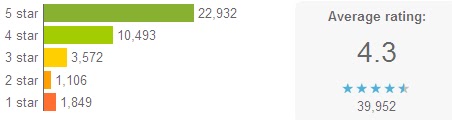
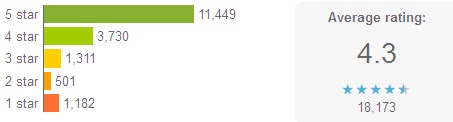
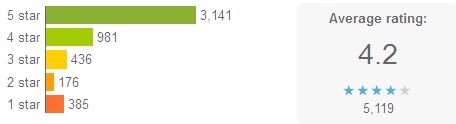
RealPlayer for Android 4.3
RealPlayer-best android player

RealPlayer for PC could be the most popular video players over the years, and this Android version is just released recently.
This media player for Android possesses a handy and intuitive user interface, allowing you to customize your music listening experience; 9 languages supported; metadata editing; optimized graphics for high-res devices, etc.
It works well for music, videos and photos, which enhanced your experiences of Android mobile media enjoyment.

Meridian Media Player
Meridian Media Player-best android player

It is a customizable player for Android phones’ video and audio playback. PlayQ instead of playlist can handle videos, music and the mixture. It supports music tag editing; srt subtitle; customized tabs, etc.

mVideoPlayer
mVideoPlayer-best android player

With a good-looking interface, it will only play whichever formats are already supported by your phone. It can be used as a video library browser as you can open videos with other applications; you can also create your own playlist with the Posters and movies information downloaded automatically and with the subtitles.

VLC (Beta)
VLC Player-best android player

It plays most local video and audio files as the desktop version and contains a media library for video and audio files; Multi-track audio and subtitles are supported; and include audio control widget for audio headsets control;
As open source free software, this cross-platform video player supports almost any formats you throw into it. It works well for desktop these years, and this beta version for Android actually needs improvement somehow. Performance improvements are missing; hardware decoding only for limited set of hardware, etc. Some users report that audio service runs in ram after closing it.

Android Video Player
Android Video Player-best android player

Well, this is the first edition of Android Video Player, and improvements are to be shown in the near future. Currently, some users say it won’t support avi video format.

There are many other video players such as BBC Media Player, but most users are complaining about its video quality. The fact is, each video player could have some flaws that need to be solved, maybe you can just find out the one suitable for you or your preferences. Players are to be updated in this article, you can download video player from Google Play.

2012/09/23

BBC Media Player for Android Devices

The “fast-changing environment” of mobile development has been well proved by the retreat of Adobe Flash from Android Mobile and the governing of HTML5, and BBC iPlayer’s permission for downloading as well.

Yet,Flash is still the best choice of media format to use, when taken so many factors into consideration: supports JellyBean and as well as earlier Android OS version like Gingerbread and FroYo; goes well with both websites and Android applications.

Thus, the BBC is launching a new media player for its iPlayer streaming app on Android powered devices: phones and tablets. In fact, BBC has supported iPlayer on Android since 2010 till its decision of removing the flash player plugin for Android.


BBC Media Player-BBC-Player-Android

The new media player is named BBC Media Player, which is already available on Google Play. BBC Media Player applies Adobe Flash’s “cousin” Adobe Air for streaming radio and video playback on Android devices.

“We want people to have the best experience possible when they're watching BBC TV programmes or listening to BBC radio programmes. This means, amongst other things, making them available on as many devices as is practical,” said Chris Yanda, executive product manager at BBC Future Media.

Facing the challenges of making services available across Android platforms as well as IOS, many broadcasters are trying to make that possible. BSkyB launched its Sky Go app for Android in January 2012 (8 months after its IOS version.)

Though many give priority to IOS platform, Android OS is quite a promising market as UK smartphone sales share in the 12 weeks to 10 June shows that: Android took 57.2% while iPhone accounted for a much less amount of 25.6.

"No technology is perfect. We've seen some of the challenges that other Adobe Air based apps have had in the marketplace and so we have worked hard, both internally and with our technology partners to build the best application we can," Yanda said. 

2012/09/18

Free VLC Player: Why do We Choose VLC?

Viewing movies on computers for enjoyment sometimes can be annoying when your video player software doesn’t go well with the video files. The ideal video player we’re dreaming of is like this: compatible with all OS and formats, user-friendly interface, safe and free will be even better.

The free and open-source VLC media player which can also be a streaming server becomes many people’s best choice for watching videos online over the past years. Why do we choose VLC player?

VLC-VLC Meida Player-free and powerful

Multi-platforms supported
As a cross-platform media player, VLC runs well in many operation systems: Microsoft Windows, OS X, Linux, Android, BSD, Solaris, iOS, Syllable, BeOS, MorphOS, QNX and eComStation

Any media file formats supported
Comparing with other video player, VLC stands out in this point when it supports almost every commonly-used media formats. Meanwhile, playback for some obscure or rarely-used formats can also be done.

Optional interfaces
VLC has a remote control interface and an ncurses interface. It allows custom selection of skins as it supports Winamp 2 and XMMS skins.

Transcoding
With a built-in transcoding tool, the media you throw into it can be output in form of another format.

Interesting video effects
It will be full of fun to add effects to the videos you are watching according to your own preference, just like an editing tool. Additionally, watermark such as text or image can be inserted into the video. Another interesting feature should be the puzzle game mode you can get with VLC.

Open-source and free, as such a powerful media player would be; VLC undoubtedly will be favored by many. In fact, VLC is not just for PC use, but also for portable devices playback as the Android VLC version is released on July 2nd this year for your Android Smartphone. VLC was available for the iPad, iPhone, and iPod Touch from the Apple AppStore, but was pulled due to a licensing conflict between the GPL and the iTunes Store agreement.

2012/09/17

Rumor or Fact: New iPod Nano Copies Old OPPO MP4?

Just as each i-device from Apple makes waves, iPod Nano also may lead to a new patent battle wave after its release. Some say the new iPod Nano somehow looks like Nokia Lumia Smartphone or the Samsung MP3 player. With some seemingly solid and visible evidence, more people tend to suspect that iPod Nano has copied an old version S33 of OPPO MP4 player.

iPod Nano and OPPO S33-patent

Just as shown in the above picture, the newly-released iPod Nano is designed in a thinner body and with a 2.5 inch display screen. The upper one is an MP4 player S33 from OPPO launched in 2009 while the other one turns to be the newest iPod Nano which was just introduced lately. From the images, obvious similarities cannot be ignored: they are both designed in rectangular design with the home button at the central bottom and a built-in accelerometer.

Actually, OPPO S33 has successfully applied for the appearance patent for its product of this version back to 3 years ago. It’s still unknown if OPPO will sue Apple or not. Is this a fact or just a rumor?

Background information:
OPPO-OPPO Electronics Corp., Ltd is an electronics manufacturer based in Dongguan, Guangdong, China. Its major product lines include MP3 players, Portable Media players, LCD-TV, eBook, DVD/Blu-ray Disc players and low cost mobile phones. (From Wikipedia)

2012/09/13

Best Free Options for DVD Playback in Windows 8: VLC Media Player

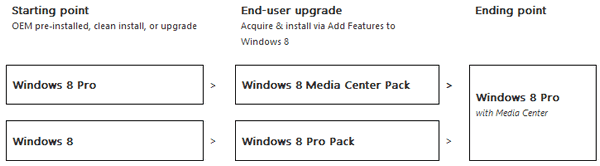
As is already not news, DVD playback is not supported in Windows 8 by default since it contains no pre-installed Windows Media Center in it. Some users find it annoying since sometimes there is need of DVD viewing. The officially recommended solution to this calls for updates of Windows 8 Pro pack, to get the Windows Media Center, which enables DVD playback. (As shown below)
Windows 8-window media center-updates path
I would rather not pay to get the Windows 8 pro pack just for DVD playback through Media Center while Windows Media Player is still not compatible with DVD. Here collects some awesome video players that can solve this problem completely and freely.

1. VLC Media Player (highly recommended)

Windows 8 DVD Playback-VLC media player
This “play-anything” video player invented by VideoLAN (non-profit organization) costs users nothing to play videos of almost any formats, DVD files included. Additionally, this free open-source video player software runs on all platforms, with Windows 8 on its list.

2. Free version of RealPlayer


Windows 8 DVD Playback-RealPlayer
As probably the world’s most widely used media player, RealPlayer allows media playback for almost any formats. It plays more file formats than Windows Media Player as announced on its official website homepage.(FYI)


3. KMPlayer

Windows 8 DVD Playback-KMPlayer
Maybe this one is not as well-known as the above two, yet it definitely is a brilliant free media player which supports various formats (including DVD), languages, skins, etc. This powerful media player, with its own internal Codec, internal or external, enables you to modify your environment to a convenient multi-media format by using KMP.(FYI)

There are many other free options to play DVD in Windows 8 PC, such as SMPlayer (with MPlayer as its playback engine and its own codecs without codec packs installment which save you much trouble), etc.

In spite of the media player as options for DVD playback in Windows 8, you can probably try other methods as well. DVD rippers to get the DVD videos in other formats for playback would be another way, I suppose. After all, it seems that Microsoft tried to strip the DVD playback function for consumers’ sake of reducing fees as has done of the opposite, I’m afraid.

2012/09/12

DVD Playback is not Supported in Windows 8 Without Built-in WMC

Without the built-in Windows Media Center, playback of DVDs encoded using the most widely-used MPEG-2 video format and Dolby audio format would not be supported in Windows 8. Nor can users burn DVDs directly, unless you pay for Windows Media Center, which is only available on the updated Windows 8 Pro version. Or maybe you can get it solved by some 3rd party software.

And from Windows 8 to the Pro version, Windows 8 Pro Pack is indispensable. In the Building Windows 8 blog, Steven Sinofsky wrote" Based on the above discussion, it should be clear that we cannot enable DVD playback all the time in Windows Media Player. Given the ongoing feedback to avoid feature overlap and to avoid the complexity of behavior changing for a previously installed component, we only enable DVD playback in Media Center once it is installed. "

DVD-Windows 8

One of the reasons for such remove of DVD playback function from its previous versions with pre-installed Windows Media Center is mainly because of the vastly decreasing usage in PC TV and DVD playback these years. Slim and portable tablets (with no DVD drive) even could be viewed as the substitution of PC, and streaming media online (Netflix, YouTube, etc.), the changing consuming direction and pattern, leads to the declining of DVDs.

For another reason, as pre-installed software for DVD playback costs, while many PCs would not ever contain an optical DVD drive as is commonly-seen in recent PCs. However, such PC Windows still carries the cost. This is somehow for consumer’s sake.

The future video supporting mainly goes to streaming online (Netflix, YouTube, etc.) playback.

However, Cyberlink would provide consumers with software for DVDs which may probably pre-installed on Windows 8. In fact, there are many other choices of DVD tool. Does this bother you if upgrading to the Windows 8?

Related Articles:

Windows 7 to Windows 8:No DVD Playback and More 
Best Free Options for DVD Playback in Windows 8: VLC Media Player

2012/09/10

Windows 8: the Built-in Flash Player Leads to Zero-day Attack

What’s the Operation System your computer runs now? Win XP, Vista, Win 7 or probably Windows 8? Microsoft’s every step is accompanied with great influences and changes. Although Windows 8 won’t be officially released until October 26th, RTM version has been applied by some enterprises to the daily work.
Windows 8 and Flash Player
This time, Microsoft adds Adobe Flash Player to its IE10 browser as a default component rather than a third party plugin. One of the reasons for Windows 8 still contains the built-in Adobe flash player is that HTML seems not so stable in the market for the moment, since flash player gave up the Android mobile market.But the built-in touch-friendly adobe flash player in browser IE10 can only get upgrades delivered by Microsoft. On August 21st, Adobe has launched updates for 0-day attack, but still leaving the early users in danger of 0-day as the Firefox being patched while embedded version in Internet Explorer not.

"If you're using Internet Explorer 10 on any version of Windows 8, including the RTM bits available via MSDN or TechNet and the enterprise preview, you are at risk." warned Ed Bott on ZDNet. Right now, Operation Systems such as Windows7, Vista, XP, Linux, etc. can get patched through security updates.
Windows 8
Lessons drawn from Apple’s previous mistakes when built-in Java in Mac devices’ failing in updates bringing up the crazy spread of Flashback virus, should be a warning for Adobe and Microsoft’s Win 8. It is said that a security update will come through Windows Update in the GA timeframe- the target date of October 26 when Windows 8 will go on sale.

Before the problem being solved, users could pick Chrome, Firefox etc. as alternatives. Or disable the built-in Flash Player temporarily.Will flash lives in IE 10 of Windows 8?