Labels

Showing posts with label Youtube. Show all posts

2012/11/09

Top 10 Free Websites to Watch NBA 2012 Online (Live)

What's the hottest news for 2012 NBA SEASON lately?  Have you seen Kobe Bryant's DEATH STARE on yestoday's NBA game? Where to watch the NBA Games Live online to catch such special moment?

Kobe Bryant-Death Stare-Lakers-NBA

Well, as the regular season has kicked off for a while, are you still struggling searching for a good online video player/website for better viewing? This period will last long enough as it usually does, during which time over 1,000 games will be put on show. These websites below will allow you enjoying the big NBA season and then the playoff, the finals! NBA fans, cheers!

NBA-Best Websites for NBA Live Online


Some Official Websites for NBA Games:

1. NBA TNT Overtime

This website is provided by Cable network TNT; yet, this time you can watch NBA streaming without cable subscription, only broadband connection is required.
This online streaming NBA differs from TV as the games are broadcasted on an interactive 4-screen interface, with each of the 4 providing a different camera angle.

2. YouTube NBA Channel

This could be another option for NBA games. But there is in great need of more uploads of latest videos.

3. NBA.com

It's updated official website for NBA Games of regular season, playoffs and the finals. Or change for the old video player for NBA games since the new updating seems to be less than satisfactory.

4. ESPN NBA

ESPN shows a live NBA every Wednesday night and a double-header every Friday night. WatchESPN.com is free to viewers who log in with an active and paid-up cable TV subscription. NBA games on WatchESPN are available to re-watch on demand for 24 hours after the game has ended.

Some other Websites for NBA Games:

5. Wiziwig.tv

Wiziwig is a site specialized in schedules for all kind of Sports. You can watch Live Sports by using the schedules. It is fully free. You only need some clients to download and then you're ready to go. Prepare to watch a lot of Football, MLB, NHL, NBA, Cricket, Tennis and many more.

6. Frombar
It shares videos of many sports: football,hockey,baseball,golf,basketball-NBA, etc. The only thing you have to tolorate is the ads.

7. Streambeam

It is similar with Frombar, also provides different sports videos, NBA live online streaming videos included.

8. NBA Live Online
NBA Live Streaming, it shares great similarities with the previous two ones. Enjoy basketball in this website.

Some NBA Apps for Mobile

9.Desktop app: vipboxsports

10. Mobile App

WatchESPN:  for iOS system from app store; while for Android system, on Google Play: NBA Game Time 2012-13


2012/11/04

Great Videos for 2012 Thanksgiving Day

2012 Thanksgiving Day  is just around the corner. As is generally known as a day for celebrating the big harvest of the year, it is a time for family gathering together for a big dinner of turkey and pumpkin pie, which could be regarded as the symbols of Thanksgiving Day. Besides, you can also join the Thanksgiving Day Parade in NYC or in Detroit, or Philadelphia.

Thanksgiving Day:
What and when is Thanksgiving Day?

Happy Thanksgiving Day-Thanksgiving 2012


Thanksgiving began as a tradition of celebrating the harvest of the year. It is celebrated primarily in America and Canada. In Canada, it is always taken place on the second Monday of October, while in the US; it is held on the fourth Thursday of each November. Historically, Thanksgiving had roots in religious and cultural tradition.

History of Thanksgiving Day


Besides the feast, there are movies about Thanksgiving Days and songs about it.

Turkey Catchers (1999)


Disney classic. Mickey, Donald and Goofy open a turkey catching business and their first customer is a pompous pilgrim. The three friends come up with the perfect plan, but when they finally catch their game, will they let their new-found friend become the main course? (from YouTube)

Thanksgiving song


From Mary Chapin Carpenter's "Come Darkness, Come Light: Twelve Songs of Christmas" album. I really love the beatiful song and the musci video. May we always be grateful.

In spite of US and Canada, there are many other countries celebrate such special times of the year. They are named in different names and held in different forms while they share similar meanings: celebrating the harvest and being grateful.

A day of Thanksgiving 


Here is a list of Thanksgiving in some other countries:

China: Mid-autumn Day Moon Cake Day on August 15th of lunar calendar. Mainly celebrates the harvest and family gathering.
Germany: early October festival, Erntedankfest.
Grenada: national holiday of Thanksgiving Day on October 25th.
Japan: Labor Thanksgiving Day as a national holiday.
Liberia: the first Thursday of Nov. is Thanksgiving Day.

Well, right after Thanksgiving, Black Friday shopping tide is coming as millions of goods on sale for your best deals. 

2012/10/23

Movies Viewing: DVD/BD or Online Streaming?

How many movies do you averagely watch in a month? And how do you watch them: DVD, Blu-ray or online streaming?

Before that, let’s check out some figures from comScore (comScore is a global leader in measuring the digital world and preferred source of digital business analytics.): 18.1 million American internet users viewed 37 billion movies for April, 2012, which suggests that 84.5 percent American internet users spent about 21.8 hours on online movies each person per month. Among the online streaming websites, YouTube top the list of viewers’ number.

Well, these figures is not surprising to me as I seldom purchase physical disks like DVDs or Blu-rays for movies unless for my favorite collector’s edition (e.g. E.T., Titanic, etc.). I always choose watch the latest movies online, regarding it as the most convenient one for me.

Streaming vs DVD

According to a new research from Mintel (Mintel Group Ltd is a privately owned, London-based market research firm.), digital download, subscription streaming and video-on-demand sales of movies will rocket tenfold from 2007 to 2017. The fact is that figures during the period of 2007 to 2012 have already quadrupled from $1.3 billion to 5.5 billion.

As physical disks such as CDs, DVDs, Blu-rays are dropping, they still remain as the major forms of movie viewing- movie rental. Steaming services like Netflix and Amazon Instant Video are gaining in popularity these days. At the same time, an increasing number of people prefer Video on Demand.

Undoubtedly, there are still large numbers of DVD lovers who cherish the nostalgic feelings, the physical belonging knot, and the background extras, as well as sharing goods with others. But in the mainstream, the general trend is leading to the leaving of traditional physical media, maybe not in 5 years, as Mintel indicated.

So, how about you? Do you watch through DVDs, Video on Demand, or streaming online? Well, personally, I’d rather a single clicking for my movie viewing online, probably YouTube, Hulu, Dailymotion, Yahoo or Vevo. Besides, I can always download them for later viewing. 

2012/10/09

Free Video Websites for HD Videos Enjoyment

Watching videos of high definition online is becoming an irreversible trend these days. For many people would like to watch videos through internet, the free video websites for HD videos below certainly could be their favorites.


1. YouTube HD

Free Video Website-YouTubeNo need to mention that it is the leader of video sharing websites worldwide, YouTube offers impressive improvements during the years, including HD videos. Earlier this year in April, YouTube launched the trail function of 1080P video 3D mode selection function. It’s of no need to introduce more about this I believe as most of us have used it already.You can change quality of 720P or 1080P by simple clicking the "Change quality " button.

2. The Akamai The HD Web

Free Video Website-The HD WebThe Akamai The HD Web features HD videos from several networks such as BBC, MTV, CBS Gannett, NBA, Cnet, etc. There are two viewing options: 720 or 1080P. But if your network condition is not well enough say below 7.5Mbps of available bandwidth, the Bandwidth Check would remind you that you may meet difficulty in viewing HD videos. Files of no larger than 120MB will be downloaded to your computer and can be viewed through Quicktime or Windows Media.

3. versuz.org

Free Video Website-VersuzHere, it seems all kind of TV series can be available, and most in high quality. The most popular ones like The Big Bang Theory, Supernatural, Gossip Girl, etc. are all shown in the list. Well, it’s no need to register or pay, just click the videos you want to watch and answer the question of common sense knowledge. It also allows video downloading. BTW, ads always come out.

4. Monetize Media

Free Video Website-Monetize MediaMonetize Media is a white-label online video platform for LIVE and ON-DEMAND video streaming. Users can upload, share and monetize contents, and also create their own channels, much like YouTube. You can find HD videos from there.

5. Vimeo

Free Video Website-VimeoAs a rapidly-growing online videos sharing hub, Vimeo possesses a HD video channel where it provides videos sharing of 720P resolution. Comparing to the standard 320*240 resolutions, 1280*720 is way better (12 times better) with 24 frames per second.

6. For music videos
Rocknrollview
This is mostly for music video shows for those music lovers. HD videos of music can be found here.
Highdefinitionmusicvideos
It also provides music videos of high quality. Well, these videos from two websites seem to originally come from YouTube.

There are, of course, many more wonderful free websites for video viewing, of which some provides high definition videos. If you know some cool ones or better ones, you can share in the comment box. And, for high quality videos, it calls for smooth network connection.

Related Article:

5 Video Sites that can Replace YouTube
Top 10 Free Options to Watch NBA 2012 Online(Live) 
Best Free Movie Apps/ Media Players for Android 

2012/09/29

YouTube Videos Download for YouTube Videos Offline Enjoyment

As you are considering about how to download YouTube videos for later viewing without internet connection, a stereotyped idea would pop up: YouTube video download is not allowed. However, there are actually some tricks for YouTube videos download.

YouTube-download youtube videos-youtube videos download

1. According to YouTube support, permitted downloading your own uploads in MP4 is supported, as long as no copyrighted content or an audio track added through the audio tool.

After signing in your YouTube account, click the “Video Manager” choice from the expanded menu of the user name and then find the video you want to download. You’ll find “Download MP4” drop down button by clicking the arrow beside the “Edit” button. Then YouTube videos download is started. This method only allows users download the videos they uploaded (without using audioswap) to their YouTube account and they come out of MP4 format. And only 2 download per hour is permitted.

2. Google Takeout (the latest update of YouTube)enables you to download your uploaded videos in the original videos files as you have before uploading them.

YouTube videos download-Google Takeout

Well, this update of YouTube makes it possible to re-achieve your own videos as the way it is. The Data Liberation Blog has listed different ways for you to download your Google plus stored data in various paths: Google+, Buzz, YouTube, etc. How to download?

3. The above two are about how to get your own videos back, but YouTube Videos download cannot be fulfilled for other videos which are not uploaded by you. The video below from YouTube about how to download YouTube videos without any software or tools will make it possible for you to download YouTube videos of all. Maybe you can have a try?


4. Besides, there are some free tools for us to get YouTube videos downloaded for offline viewing. The only shortcoming is that there is always certain kind of limitation or lack of function.

You can try YouTube by click (available for both videos and music), or YouTube-mp3.gov (which used to be a wonderful tool, free and simple, but banned by Google now), and many more!

5. After all, there are some powerful YouTube downloader software as well, although they cost some money, they actually perform better and with comprehensive functions.

With these tips, you can download your favorite videos or even music from YouTube for later offline enjoyment whenever you like!

2012/09/26

Best Tips to Smooth YouTube Playback without Lengthy Buffering

As the world’s most popular video sharing website as well as U.S. teens’top choice for listening music, the huge amount of video content on YouTube leads the global trend at an explosive speed while stream buffering makes videos viewing unsuitable for its spread pace. There are some best tips to smooth YouTube playback without too much boring waiting.

YouTube video loading time-buffering-YouTubePremise: your computer should be in a normal condition and well-connected to the network, which means you can watch YouTube videos but maybe with slow loading.
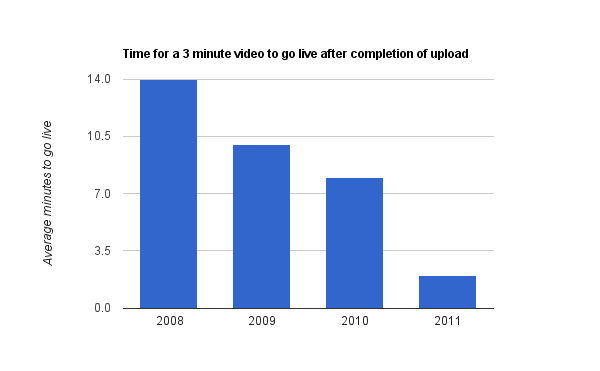
1. YouTube “Feather” beta: it enables YouTube faster speed for video viewing, but just for some videos currently as it is still in progress. As it is intended to serve YouTube video watch pages with the lowest latency possible, it causes severe loss in the features available: expanding share boxes, collapsible comments, and a long list of related videos on the side of the page. And the simplified layout would be: first few comments as fixed text on the page; only offers thumbs up/down, flag buttons; “related videos” shows in 5 items; etc. By reducing the bytes downloaded by the browser, loading time shortens. LOL, the ads are still on.

2. YouTube HTML5 Video Player: most videos’ playback would be realized by HTML5 player instead of flash player if you are using a supported browser (Firefox4, Google Chrome, Opera 10.6+, Safari, IE 6,7,8,9).


3. Change your DNS servers.
  • Go Windows Start button, and run Control Panel.
  • Click on Network and Sharing Center.
  • Select Manage network connections.
  • Double click on active internet connection, probably named as Local Area Connection.
  • Click Properties.
  • Now double click Internet Protocol Version 4 (TCP/IPv4), located in middle form.
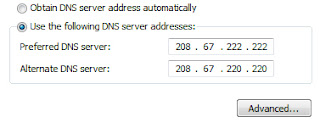
  • Select Use the following DNS server addressed, and change them to:
Preferred DNS Server: 208.67.222.222
Alternate DNS Server: 208.67.222.220

Updated on 10.06.2010: If you are located in Europe, I would recommend you to use Google’s public DNS servers:

Preferred DNS Server: 8.8.8.8
Alternate DNS Server: 8.8.4.4

change DNS
  • Click OK to confirm changes to Open DNS servers.
4. Additionally, to those who only listen to music and care less about the MV video, you can try Fav Tube maybe. Since no video is loading, speed will be faster. Of course, there are lots of other tools.

5. Little tricks: maybe you can just watch to watch the later part of the video, just drag the play bar to the point you want to start, it will start buffering from there. Or if it still won’t work after all these are done, you may just download the YouTube video for enjoyment. Or check out your internet condition!

Without the boresome waiting and waiting, you can now smooth your YouTube videos playback. Have a try! May there be some other better ones? Leave a comment to let me know. (The 4th method is from: fixexe, thanks)

2012/09/25

Observe iPhone 5 in Video Shooting and Video Viewing

Disappointed to many apple fans, iPhone 5 was defined as an evolution rather than an expecting revolution. If you allow me, superficially, the most outstanding new feature goes to the lengthened screen (and the thinnest iPhone). However, when you take a close at the screen, you’ll notice that it may indeed become one of the improved traits.

iPhone 5-video viewing

1. Video Shooting in iPhone
iPhone 5 camera definitely could be regarded as an impressive camera among phones. Compared with the previous iPhones, the iSight camera still remains to be 8-megapixel, but with a new sapphire-crystal lens, enhanced feature in dynamic low-lighting adjustment, image stabilization on the 1080P video camera, and photo shots (screen captures of the video) while shooting video.

With these improved features, shooting videos with iPhone 5 will be nice to experience as shown in the 2 most excellent traits.
  • Image stabilization: video clips shot while in moving situations can be impressive instead of jerky and jumpy, which makes video quality terrible. Though not as perfect as dedicated/professional video camera, slower motions are definitely smoothed out.  
  • Panorama mode at a fast speed: this new feature could be get by freely updating iPhone 4S. Ultra-wide shots by slowly moving the iPhone camera from left to right while in portrait mode, all 360 degrees could be included in your pan. And the faster processing chip in iPhone 5 makes the camera opens 40% quicker and responds swiftly.
2. Video Viewing in iPhone 5
As many of us have known that YouTube app is excluded in iPhone 5 as a built-in app, which means even with a half-inch larger screen, the previously built-in YouTube app is no longer available. However there are still various ways to watch videos through YouTube on iPhone 5.

apple app store-YouTube


  • Users can download the YouTube app which is developed by YouTube from app Store. This offers better experience than viewing through browser. Tap the App Store and Select search in which entering “YouTube” to install the YouTube app.
    The newly released App by YouTube, (one day earlier before iPhone unveiled), provides with better sharing to social media, channel support, but it lacks uploading function. Besides, the taller screen seems to make the video size unsuitable for there is black boxes above and below on the iPhone 5 4-inch screen.
  • Another way to watch videos through YouTube on iPhone 5 is through mobile Safari. Visit m.youtube.com for video viewing on iPhone 5, though slower in speed and lower in quality, could be nice after all.
  • Compatible with both iPhone 5 and iPad, YouTube app Jasmine is the best option for you, and even could be better than what Google was offering until now, which could not go with iPad. Functions as search/browse for videos, access your playlists, viewing history, favorite videos, and subscriptions can all be realized in this app. What’s more, you can also toggle between night/day mode easily, and control appearance, video playback, and parental controls among many other settings.

    The YouTube app by YouTube and the mobile Safari won’t allow uploading/sharing videos to YouTube, but uploading through the built-in Photos app and iMovie app is still available.

  • With the enhanced camera, you can catch better motion videos of your daily life, edit and then upload through iMovie and watch the videos through YouTube app. After all, from the video point of view, iPhone 5 does get evolved to some extent, or does it? 

    2012/09/19

    Prometheus Leads Fox's Digital HD for the Latest Movies through New Streaming Access before Discs

    Want to reach the latest blockbuster weeks earlier before DVD and Blu-ray copies available? As announced earlier this month, 20th Century Fox would make it possible by offering users support for streaming movies services-selling HD digital copies of movies, either stream or download the movies. As a matter of fact, the sci-fiction movie "Prometheus" leads the trend, which is already on the shelve for downloading while the disc version won't come out until Oct. 11th.

    Prometheus-20th century fox-streaming

    Such new access for latest movies services work through iTunes, Google Play, Amazon, Cinema Now, PlayStation, Vudu, Xbox Live and YouTube as well. It is named as "Digital HD", which provides movie addicts better offer: earlier release at lower cost of similar quality, even with Cloud storage as well as multiple devices supported. Prometheus just appears as an excellent example when you can get it now for $15 (DVD for $29.9 while BD for 39.9 on October 11). As Mary Daily(President of Worldwide Marketing and Chief Marketing Officer, Twentieth Century Fox Home Entertainment) put it: "Over time, DIGITAL HD will embody the benefits of HD quality and the ultimate all-access pass to the best in entertainment".

    Actually Fox took efforts to promote its discs over the past few years, while this transition to stream access for movies indicates that digital will rules the future pictures, it's the coming of medium time (as Mike Dunn-worldwide president of 20th Century Fox Home Entertainment believed).


    According to Fox, the New Digital HD for the Latest Movies through Streaming Access before Discs is available around 50 countries and more. With the alien Prometheus as initiative Digital HD, 600 movies including Abraham Lincoln, Vampire Hunter, The Watch, among others, will soon be shown on the above retailers such as Amazon, iTunes, etc.

    2012/08/21

    5 Video Sites that can Replace YouTube

    YouTube was created in 2005, but much like Google, it feels like it’s been around forever. We post our videos on YouTube, look for some silly entertainment during boring afternoons and send videos along to friends much like old ladies used to spread gossip around town not very long ago.

    But should you be limited to YouTube? Let’s be honest, there is a whole world of streaming video online that most people have never seen because they have settled for YouTube. Most sites have the same features, or features even better than YouTube has and some have a more specialized selection or much higher quality videos.

    So here is a small sample of video sites you should check out that many people feel are better than YouTube.

    1.Current TV
    Current TV-video sites 

    Current TV is a website that is also a TV channel, but unlike all other tv sites, that post their content from tv on their sites, Current plays the content from their website on TV. People post their videos, or pods, on the site which get voted by the community and the highest ranking ones get on their television channel. Current has an enticing variety of videos, but the heart of the site is its amazing independent journalism. On Current, you can see all the reports that usually don’t get on television, or a whole new approach to the news you do see. For video producers, it’s a chance to get your video on tv and a little bit of cash to go with it.

    2.TED
    TED-video sites 

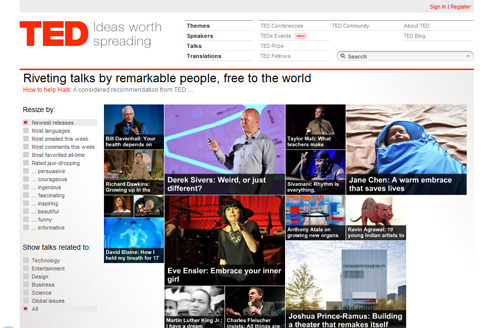
    TED is unique in the world of streaming video, and it is brilliant in its own way. TED’s whole concept is to spread ideas, and to accomplish that, it has enlisted some of the most brilliant minds in the world to create “talks” about topics as diverse as Eve Ensler’s “Embrace your inner child”, Murray Gell-Mann’s ”Beauty and truth in physics” or Bill Gates’ “Mosquitos, malaria and education”. Better than YouTube in another way, the search on the site also works in an ingenious way, letting you search by keywords or by themes such as: inspiring, beautiful or fascinating. For those of us who are eternal students, TED is a jewel of endless facets.

    3.Big Think
    bigthink-video sites 

    Following a very similar style to TED, Big Think takes an interview approach to its video instead of a prepared talk. The result is a very interesting group of answers that make you feel like you actually got to ask a famous expert the question yourself and he had the kindness to reply. It’s not as evolved as TED is, but it is certainly biting at its heels.

    4.Atom
    Atom-video sites

    If you think YouTube videos are funny, you’ve never visited Atom, previously Atom Films. With an enormous array of animations, comedy shorts and sketches, Atom hasn’t lost its edge after its acquisition by MTV. Because of its huge selection of talented filmmakers who normally contribute to the site and with their own staff filmmakers, who were selected from some of the funniest sites online, Atom manages to consistently have shorts that will lighten up the most boring of days.

    5.Blip.tv
    blip.tv-video sites

    Created on May 11, 2005, the same year as YouTube, Blip.tv has mimicked what network television channels offer but using the same resource Current TV uses: independent producers. It currently has about 48,000 independently produced Web shows and approximately 22,000,000 viewers. They share the revenue of their ads with the producers, which allows them to make some income from their shows and keep producing them and in exchange, Blip.tv gets a constant supply of episodes for their site. So what can you find on Blip.tv? Mostly, the site consists of series of shows, much like television shows, with genres like dating, technology, animation and a diverse group of fiction stories.

    There are of course many more video websites for you, you can choose one for yourslef. For entertainment or information, these websites above are great.

    Source:makeuseof

    2012/08/19

    No.1 Option for Teens' Music Listening: YouTube

    Gone are the days of teenagers buying albums and listening to them all the way through, as are the days of following beloved radio DJs and tuning in at the appropriate times. The new generation is opting for their own music curating by means of YouTube, according to a new study released today by consumer research firm Nielsen.

    YouTube-musicAlthough many people -- 48 percent -- still discover music through radio, the majority of teens -- 64 percent -- listen to tunes through YouTube. Nielsen's report, called Music 360, takes an in-depth look at how different age groups are buying and listening to music these days.

    "The accessibility of music has seen tremendous expansion and diversification," Nielsen's senior vice president of client development David Bakula said in a statement. "While younger listeners opt for technologically advanced methods, traditional methods of discovery like radio and word-of-mouth continue to be strong drivers."

    Even though lots of teens are listening to music via YouTube, roughly 50 percent are still buying CDs, listening to the radio, and using iTunes. Over the last year, 33 percent of adolescents bought a CD and 51 percent have purchased a music download. Teens also tend to have their finger on the music pulse more than adults -- 33 percent bought a digital track within one week of release, while only 21 percent of adults did.
    Here are some other interesting stats from Music 360:

    Positive recommendations from a friend are most likely to influence purchase decisions

    54 percent are more likely to make a purchase based off a positive recommendation from a friend
    25 percent are more likely to make a purchase based off a music blog/chat rooms
    12 percent are more likely to make a purchase based off an endorsement from a brand
    8 percent of all respondents share music on social networking sites, while 6 percent upload music

    Music player apps are most prevalent, followed by radio and music store apps

    54 percent have music player apps on their smartphones
    47 percent have radio apps on their smartphones
    26 percent have music store apps on their smartphones

    Digital music is seen as a slightly better value than a physical CD

    63 percent of purchasers identified digital albums as a very or fairly good value
    61 percent identified digital tracks as a very or fairly good value
    55 percent identified physical CDs as a very or fairly good value

    It's important to point out that Nielsen's report doesn't take into account music streaming services like Pandora, Spotify, and iHeartRadio, which is a growing way for people to discover and listen to music.

    Bakula also noted that as music becomes more widely accessible with technology and the Internet, more people are now listening to music. "With so many ways to purchase, consume and discover great new music," he said, "it's no wonder that the consumer continues to access and enjoy music in greater numbers."

    Source:Cnet

    2012/08/14

    World's Second Largest Video Sharing Website-Dailymotion

    dailymotion-website player
    Dailymotion is a French video-sharing website on which users can upload, share and view videos. Its headquarters are in the 18th arrondissement, Paris, France. According to Comscore, Dailymotion is the second largest video site in the world after YouTube.

    As of October 2010, the site was getting over 93 million unique visitors monthly and is the 32nd most visited website in the world.

    Since February 18, 2008, the site supports video content that can play at 720p on a HD set, but the bit rate is significantly less than the 5–9 megabits for expected HD quality.

    On January 25, 2011, France Telecom's Orange entered exclusive negotiations with Dailymotion with a view to acquiring a 49% stake in the company for EUR 62M (hence valuing the company at EUR120M). According to LesEchos.fr, Orange is considering to acquire the 51% stakes left of the company to fully own DailyMotion. This potential buyout couldn't exceed €72M, and the transaction date would occur during the first quarter of 2013.
    dailymotion
    The dailymotion.com domain name was registered one month after youtube.com was registered. Dailymotion allows users to browse and upload videos by searching tags, channels or user-created groups; the search system also introduces results based on things other users have searched for. The maximum size of a video file is 2 GB. The length of the video file is also limited to 60 minutes, except for the MotionMakers and the Official Users.

    MotionMaker is a group for the original content creators. Official User is a group for the official content producers (i.e.: record labels, film studios, news media, television channels, sports associations, political parties, etc.)

    A MotionMaker or an Official User can :
    • Customize his/her profile
    • Upload videos of unlimited length
    • Upload Full HD quality videos (1920*1080p), whereas regular users are limited to Half HD (1280*720p)
    • Benefit from an increased visibility
    • Have an OfficialContent/CreativeContent overlay affixed on his video thumbnails
    Dailymotion with the help of Audible Magic, implemented an acoustic fingerprinting system that can detect copyrighted videos and not publish them. Dailymotion is also the first video sharing website to implement a video fingerprinting solution supplied by INA.

    Source:wikipedia

    2012/08/12

    Top 3 Video Players to be Embedded to Your Blogs

    Whether blogging for business or for your personal purposes, there are cases when you need video players embedded to your blogs for better explanation and deeper understanding. Therefore, you need third-party video players for better results.

    When choosing which embedded video players to use, factors such as: editing effects, annotation features, embedding features, uploading limits, etc. should all be taken into consideration. Or maybe your personal preferences would also be a decisive requirement. Thus, according to my collection and some research, I would like to recommend you some useful and robust video players for better promotion of your blogs.

    1. YouTube

    It’s impossible not to get YouTube video player involved in this filed; this video giant provides many outstanding traits for users’ demands. And it also brings about surprises all the time.
    YouTube-Olympic-Phelps
    YouTube allows HD videos of 1080p, and even for 3D effects with a simple clicking in the transition button. Group privacy and private urls are available. Besides, the video editing function save trouble of searching for another kind of video editing tools. What’s more, there are new features released all the time such as the face-blurring effects, figure recognizing, etc. After all, YouTube shows you the latest video information and suggest the most popular ones.

    2. Vimeo

    As another U.S.-based video-sharing website on which users can upload, share and view videos, Vimeo makes it easier for users to embed their own videos, just as the word “vimeo” suggested- “me” be inserted into the word of “video”, which means “Vimeo” is for user-made videos. Besides, it is also an anagram of the word "movie"!
    Vimeo-video player
    Vimeo also supports HD videos for even longer duration time than YouTube. Great URLs are possible for users. And users can also set passwords for protecting their personal videos from being shown to public.

    3. Flickr

    Stereotyped as a photo sharing website to most people, Flickr offers people great opportunity to share photos, discoveries and happiness with others in just a minute. The fact is that, people can also camera filming to upload videos for sharing as well. Actually flickr is an image hosting and video hosting website, web services suite, and online community, which is widely used by bloggers to host images that they embed in blogs and social media.
    Flickr-video player
    It can group video in collections with relevant photos. But free account users are allowed to upload 300 MB of images and two videos per month.

    Well, there are of course other video players that can be embedded to your website, to your blogs, such as DailyMotion, etc. These 3 most popular video sharing hubs could already help you with your blog videos, with the most interesting ones, newest ones, or popular ones, to make it fun.

    2012/08/09

    Top 5 Free Video Plugins for Your Wordpress

    Wordpress as a blog platform is becoming more and more popular these years. To make your wordpress blog widely-exposed, the WordPress video player plugin, which is a great way to extend the basic framework of wordpress to accommodate very advanced features for adding video content on your blog, helps you a lot just as what a new theme will do.

    There are many plugins of video players that could meet users’ requirements. Below, I’ll introduce 3 wonderful and popular ones for your choices.

    VideoJS–HTML5 Video Player for WordPress
    As a video plugin for WordPress built on the Video.js HTML5 video player library, Video JS is the most popular HTML5 video player available. With this wonderful tool, you can embed video in your post or page using HTML5 with Flash fallback support for non-HTML5 browsers.
    videoJS
    An HTML5 Video Player is a JavaScript library that builds a custom set of controls over top of the HTML5 video element to provide a consistent look between HTML5 browsers.

    VideoPress
    An account of wordpress will be needed, if you don’t have one, several minutes signing up would be done. The VideoPress plugin allows blog administrators to upload new videos to their WordPress.com video account and manage existing videos from the convenience of their self-hosted WordPress.org blog’s administrative interface. Authors can add any VideoPress video into a blog post through the use of a simple shortcode and customizations.
    video press
     JW Player for WordPress
    With JW Player for WordPress, it is quite simple to deliver Flash and HTML5 video through your WordPress website. It manages multiple custom players and allows for easy customization interface, and embedding of Flash and HTML5 video using the JW Player in your WordPress posts. It provides support for all of the player’s configuration options, including skins, plugins and the LongTail Video AdSolution.
    JW Player
    The full featured playlist manager-order your media by dragging the mouse, makes it even more convenient to use.

    All in One Video Pack
    This plugin offers every functionality you would need for video and rich-media, functions of upload/record/import videos directly to the post included, which makes it more than just a video embed tool. In addition, you can edit and remix videos using Kaltura’s online full-featured video editor. Importing from various sources of websites would be a piece of cake. Many more advanced features will be found out during your use of this video player. You can get it installed in 4 steps within a few minutes. And sharing videos with others can also be made by it.
    All in One Video Pack
    Viper's Video Quicktags
    Video and audio plugin for WordPress built on the MediaElement.js HTML5 media player library. It allows you to get videos from websites such as YouTube, Vimeo, etc. to your wordpress website in an easy way. Just simply click one of the new buttons that this plugin adds to the write screen (rich editor included) and then paste the URL that the video is located at into the prompt box. The width, height, and other specifications of the video can be customized accordingly.
    Viper's Video Quicktags
    It supports iPhone, iPad, and Andriod. Supports MP4, OGG, WebM, WMV, MP3, WAV, WMA files as well as captions with WebSRT files.

    Although there are also many premium video plugins available in the wordpress.org, these 5 popular and robust free video players certainly could fulfill most of your requirements.

    2012/07/31

    Step up 3 Trailer

    "It's time for protest art!" Another one? Indeed. This time Summit has taken over and instead of calling it Step Up 4 3D x10, it's just called Step Up Revolution, directed by Scott Speer, of "The LXD" previously. The trailer has just premiered online via ClevverTV and it's two-and-a-half minutes packed full of dancing ridiculousness, from floating cars to painted museum art come-to-life to office building dance offs to giant trash robots to dancing policemen. Yea, it's exciting. The obviously beautiful-looking cast this time includes Kathryn McCormick, Ryan Guzman, Stephen Boss, Chadd Smith and Megan Boone. Have fun!
    Watch the first official trailer for Scott Speer's Step Up Revolution, in high def on YouTube:

    "It's more than a step, it's a revolution!" Emily (Kathryn McCormick) arrives in Miami with aspirations to become a professional dancer. She soon sparks with Sean, the leader of a dance crew whose neighborhood is threatened by Emily's father's new development plans. For more updates, visit their Facebook or Twitter.

    Step Up Revolution is the feature directorial debut of filmmaker Scott Speer, who worked on Jon M. Chu's "The LXD" and directed The LXD 2: Secrets of the Ra, and produced The Beat as well. The screenplay was written by newcomer Jenny Mayer. Produced by Offspring and Summit Entertainment, Step Up 4, or Step Up Revolution, is being released in 3D in theaters on July 27th this summer. Looks pretty crazy, eh?

    from firstshowing

    How to Download Olympic Videos to Your Mobile from YouTube

    As London 2012 Olympic is processing vigorously, people around the world are watching this great event online or through TV. But if you’re a white collar who have no time watching during the day or staying up in the night for watching the live, downloading from the internet would certainly be awesome for you.

    You can download your favorite Olympic videos from the world’s most popular video sharing website-YouTube with Leawo Free YouTube Downloader. Leawo speeds up video playback and video downloading, and fast download YouTube videos and other FLV videos from YouTube.

    It takes only 3 steps to make download videos with Leawo Free YouTube Downloader.

    Step 1: Search and choose.
    In the Browse section, you can enter your keyword like “London 2012 Olympics” or just copy and paste the YouTube video url in the address bar. Play the video you choose and a monitor message prompt from the right button corner will remind you to download it by clicking “save as”.
    leawo free youtube downloader-browser
    Step 2: Preview and convert.
    In the Video Section, the built-in video player allows video previewing. In addition, it also acts as a converter. Choose the video in this section and then click the convert button for formats you need.
    leawo free youtube downloader-video
    Step 3: Conversion process viewing.
    Here you can monitor and complete the conversion process. After the conversion is finished, you’ll get the Olympic videos you need.
    leawo free youtube downloader-convert
    Optional Settings:
    1. In the “convert” tab, you can also delete, converter and burn the videos.
    2. The “setting” button in the right corner allows your editing of some video information.

    Leawo Free YouTube Downloader help covert videos to other formats to fit for your portable devices such as mobile phone. With it, you don’t have to wait for the streaming. Besides, videos from other video-sharing websites like Google Video, MySpace, etc. also can be easily downloaded by using this great tool- Leawo Free YouTube Downloader.

    Download the Olympic videos you like the best, store it in your mobile phone and watch anywhere you want, without worrying about the network condition.Enjoy your Olympics!

    2012/07/26

    How to Watch 2012 Olympics Games?

    The following 3 methods will be nice for you to enjoy watching London 2012 Olympic Games.

    1. London Olympics Live Streaming on YouTube
    Youtube has official live streaming of the all Olympic games by IOC (International Olympic Committee). You can watch live streaming of the games in more than 60 countries including USA, UK, India. All you need is a browser on any device including PC/Mac, iPad, Android Tablets like Nexus 7, iPhone, Android phones like Galaxy S3 etc.

    2. TVCatchup.com lets you watch live free-to-air UK television on your computer, phone or games console. Versions of the site optimised for iPad and iPhone are available at ipad.tvcatchup.com and iphone.tvcatchup.com.
    Head to TVCatchup.com and click the Sign Up button to begin. You'll need to enter a username, email address and password, then click Submit.

    Once logged in, you're presented with a channel list. The London 2012 Olympic Games will be broadcast by the BBC; choose the correct channel for the particular event you want to watch live online. You can also change the stream quality, which is useful if you don't have a particularly fast broadband connection.

    If this is the first time you've used TVCatchup, it will prompt you to update your profile with your gender, date of birth and occupation before you can begin watching live TV. On the following screen you will also need to select your region preference, then click Update Region.

    TVCatchup kicks off with an ad or two, then immediately begins streaming your chosen TV channel. Sit back, relax, and enjoy the sport.

    3. iPlayer is the BBC's free catch-up TV service. Programmes are available for seven days following their transmission, but note that the service's Download and Series Record features are not usually available for sporting events, such as the London 2012 Olympic Games.
    To watch the London 2012 Olympic Games on a Windows, Mac or Linux PC, simply head to bbc.co.uk/iplayer for the desktop version of the site. Dedicated apps are available from Google Play and the App Store for Android 2.2+ tablets and the iPad respectively, while Xbox 360, PlayStation 3 and Nintendo Wii owners can stream content from Xbox Live, the PlayStation Network or through a Wii app.

    If the sporting event you're after isn't featured in the top panel, choose BBC One or BBC Two in the TV Channels section to the bottom left. The following screen will show the programme listings for the past seven days; you can also view today's guide and listings for the next two days. Click the date on which the event was broadcast in the timeline at the top of the screen.

    Scroll down to find and select the event in the list. Click the arrow in the video frame to begin playback. Clicking again on the preview window reveals options to pause, fast-forward and rewind the action, turn on subtitles, and watch the event full-screen or in a pop-out window.

    From pcadvisor

    2012/07/23

    How to Watch London 2012 Olympic Games?

    Jonathan Edwards talks you through the official London 2012 Mobile guide to help you plan, enjoy and share your Games experience. Free to download for your device from http://www.london2012.com/mobileapps

    From YouTube

    2012/07/04

    Videos from Your Mobile Phone to Youtube

    If your phone has a camera with video capture, you can easily post videos to YouTube that you take with your mobile phone. Visit www.youtube.com/mobile to learn more.

    From youtube