Showing posts with label VLC. Show all posts

2012/11/18

Is Free VLC Back for i-Devices to Hit App Store?

Are you still missing the missing VLC media player for iPhone, iPad and iPod since it has been pulled down from the app store due to licensing issues?

VLC for iPhone-VLC App
Roughly two years ago, shortly after its release on App Store, Apple decided to remove it from the store. If you are not lucky enough to get VLC downloaded before it was pulled then good news is that this most welcomed free media players nowadays, with its abundant video formats supporting, awesome editing features and more updatings, is announcing its back to app store! Will it finally be shown on App Store once again?

Considering of the previous issue encounted, as the developers have changed the majority of software modules using software licenses, thus the media player is now switched to be licensed under LGPL (Lesser General Public License). LGPL which is unlike that of the GPL (General Public License), LGPL (Lesser General Public License) allows the application to be linked to the code that is not itself under the LGPL. As the president of VideoLan and lead developer, Jean-Baptiste Kempf, told the French PC Inpact: VLC is now legal to be put back on app store.

VLC Media Player, free, multi-platform, multifunctional, could play almost any video formats you throw at it. With it, you can watch movies on TV shows on your iPhone, iPad, or ipod ignoring the limitations of video formats your i-Devices support. That certainly would be a great improvement from the QuickTime!

Articles about VLC:

Free VLC Player: Why do We Choose VLC?
How to Enable Blu-ray Playback in VLC Player ?

2012/10/15

How to Enable Blu-ray Playback in VLC Player ?


VLC Player- Blu-ray and VLCAs one of the most favored open-sourced and free media player of versatile functions, VLC media player enjoyed high reputation for its powerful playback feature. Just like what you’ve heard about VLC, it supports almost any video formats you got. Then how about Blu-ray?

How to enable Encrypted Blu-ray playback in VLC player? Below are some tips for your reference.

1. Free method
With some tricks, the latest VLC 2.0.x media player would be able to enable Blu-ray playback for most of them released before 2012. While BD+ is not supported.

To get Blu-ray to work in VLC run these commands:
Code: [Select All]
sudo add-apt-repository ppa:n-muench/vlc
sudo apt-get update
sudo apt-get install libaacs0 libbluray-bdj libbluray1
sudo apt-get dist-upgrade

Now we need to make an aacs folder and download the keys:
Code: [Select All]
cd ~/
mkdir -p ~/.config/aacs/
cd ~/.config/aacs/ && wget http://vlc-bluray.whoknowsmy.name/files/KEYDB.cfg

(This method is from pinguy, for more information you can refer to Blu-Ray Encrypted/Retail Playback & Ripping in VLC)

2. Official Method
You'll need two files: keys database and AACS dynamic library. For more related information check this forum out.
After some search and trail I’d also recommend you this video from YouTube to get Blu-ray discs played in VLC media player.


3. Easy method
If you do not want bother to make such complicated settings and adjustments, you may just try some useful tool to get the encrypted Blu-ray videos out and then play on VLC player. Well, this may cost some while saves trouble. The professional ripping tool I came across from this software from Cnet download site would definitely perfect your video viewing experience.

2012/09/28

Best Android Player for Android Phone

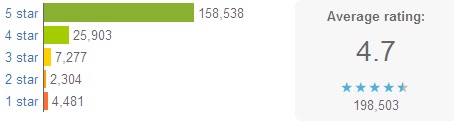
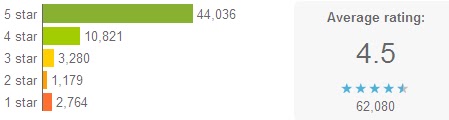
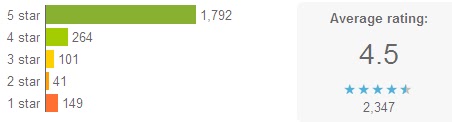
Android 4.1 Jelly Bean seems to arrive with the curtain call from Flash Player for Android Smartphones. While on-the-go video viewing is the best option to kill boring waiting time, you need some best Android video players. After some search and collecting, I recommend some free Android video players among the best for your reference.(rating and votes form Google Play)

MX Player
MX Player-best android player

Main features: Hardware decoding (h/w decoder enables hardware acceleration); Multi-core decoding (it is the first Android video player that performs multi-core decoding, which makes great performance improvement); pinch to zoom (zoon in/out); subtitle scroll; kids lock (prevent kids from calling or so).
This free android video player supports almost every movie files including flv, divx, vob, webm, .xvid and so on in Android 4.1 Jelly Bean.
Some users complained about HD video playback lags.

MoboPlayer
MoboPlayer-best android player

It is said to be compatible with all video formats, in most cases, when the “software decoding” mode is selected. Then you can watch videos without worrying about what formats the video player may not run. Besides, MoboPlayer supports subtitles, multimedia streams and multi-subtitles, playlists, etc.

Dice Player
Dice Player-best android player

Most formats are supported by it.
HW Accelerated Video Player with Playback speed control and Network support. It supports pop-up play with multiple audio tracks and subtitle track (includes external sub).
Video capability depends on your devices HW video decodes' capability.

QQ Player
QQ Player-best android player

It supports all the popular video formats with the plug-in subtitles SRT, SMI, and MKV embedded subtitle. Multiple audio tracks options can be chosen by users; one of the outstanding features is that the smart core technology makes video playback smoother along such a small interface. But there are currently no English subtitles available. And FLV video may not go well with it. Some users even hate the updates and prefer the previous version.

RealPlayer for Android 4.3
RealPlayer-best android player

RealPlayer for PC could be the most popular video players over the years, and this Android version is just released recently.
This media player for Android possesses a handy and intuitive user interface, allowing you to customize your music listening experience; 9 languages supported; metadata editing; optimized graphics for high-res devices, etc.
It works well for music, videos and photos, which enhanced your experiences of Android mobile media enjoyment.

Meridian Media Player
Meridian Media Player-best android player

It is a customizable player for Android phones’ video and audio playback. PlayQ instead of playlist can handle videos, music and the mixture. It supports music tag editing; srt subtitle; customized tabs, etc.

mVideoPlayer
mVideoPlayer-best android player

With a good-looking interface, it will only play whichever formats are already supported by your phone. It can be used as a video library browser as you can open videos with other applications; you can also create your own playlist with the Posters and movies information downloaded automatically and with the subtitles.

VLC (Beta)
VLC Player-best android player

It plays most local video and audio files as the desktop version and contains a media library for video and audio files; Multi-track audio and subtitles are supported; and include audio control widget for audio headsets control;
As open source free software, this cross-platform video player supports almost any formats you throw into it. It works well for desktop these years, and this beta version for Android actually needs improvement somehow. Performance improvements are missing; hardware decoding only for limited set of hardware, etc. Some users report that audio service runs in ram after closing it.

Android Video Player
Android Video Player-best android player

Well, this is the first edition of Android Video Player, and improvements are to be shown in the near future. Currently, some users say it won’t support avi video format.

There are many other video players such as BBC Media Player, but most users are complaining about its video quality. The fact is, each video player could have some flaws that need to be solved, maybe you can just find out the one suitable for you or your preferences. Players are to be updated in this article, you can download video player from Google Play.

2012/09/18

Free VLC Player: Why do We Choose VLC?

Viewing movies on computers for enjoyment sometimes can be annoying when your video player software doesn’t go well with the video files. The ideal video player we’re dreaming of is like this: compatible with all OS and formats, user-friendly interface, safe and free will be even better.

The free and open-source VLC media player which can also be a streaming server becomes many people’s best choice for watching videos online over the past years. Why do we choose VLC player?

VLC-VLC Meida Player-free and powerful

Multi-platforms supported
As a cross-platform media player, VLC runs well in many operation systems: Microsoft Windows, OS X, Linux, Android, BSD, Solaris, iOS, Syllable, BeOS, MorphOS, QNX and eComStation

Any media file formats supported
Comparing with other video player, VLC stands out in this point when it supports almost every commonly-used media formats. Meanwhile, playback for some obscure or rarely-used formats can also be done.

Optional interfaces
VLC has a remote control interface and an ncurses interface. It allows custom selection of skins as it supports Winamp 2 and XMMS skins.

Transcoding
With a built-in transcoding tool, the media you throw into it can be output in form of another format.

Interesting video effects
It will be full of fun to add effects to the videos you are watching according to your own preference, just like an editing tool. Additionally, watermark such as text or image can be inserted into the video. Another interesting feature should be the puzzle game mode you can get with VLC.

Open-source and free, as such a powerful media player would be; VLC undoubtedly will be favored by many. In fact, VLC is not just for PC use, but also for portable devices playback as the Android VLC version is released on July 2nd this year for your Android Smartphone. VLC was available for the iPad, iPhone, and iPod Touch from the Apple AppStore, but was pulled due to a licensing conflict between the GPL and the iTunes Store agreement.

2012/07/24

VLC for Android

As a free and open source cross-platform multimedia player, VLC video player supports most multimedia file formats, including discs, devices, or network streaming protocols.
This widely-welcomed multimedia player developed at an astounding speed. From the birth year of 2005 to this year 2012, the total downloading figure reaches 1 billion. According to some data analysis, the majority downloading is from Windows platform (about 89%); and that from Linux and Mac is much lower, yet at a high installation rate. Even people say the actual number could be much more than this.

The new version for Mac Retina screen is available already. This version solves the previously reported problems such as playing in Blu-ray, and video rotation, crop, etc.

To achieve the target of becoming one of the most comprehensive and sophisticated multimedia player, VLC developed the Android version for the users. It is released in the VideoLAN on July 2nd and can be downloaded from Google Play. For the moment, the new version only can support ARMv7 processor, and the developers announced that it will be compatible with more smartphones and tablets in the near future. Temporary, this version is not stable and is slower than the final version.

2012/07/17

Free Mac VLC Player?

VLC Media Player is a longtime open-source favorite, and the latest version offers fixes and feature enhancements for the Mac version that make it a must download. It's not the only option for free video playback, but it's one of the best, and it's often the go-to media player for Mac users who can't seem to play a specific media file.

VLC Media player offers a number of tools and customization options to manage and watch video. Users get frame-by-frame advancement; granular speed controls allowing for on-the-fly slower or faster playback; and live recording of streaming video. The toolbars are fully customizable, so you can have only the buttons you need in the interface.

This version comes with improvements to the interface, support for MxPEG files and streaming, and more. Along with minor tweaks, VLC continues to offer robust support for a wide range of video and audio formats, including OGG, MP2, MP3, MP4, DivX, HD codecs like AES3, Raw Dirac, and even support for playing back zipped files. It can also be used as a server to stream in unicast or multicast in IPv4 or IPv6 on a high-bandwidth network.

The default interface was improved in recent updates, but integrated skinning can make it even better. Behavior can still be a bit unpredictable depending on the quality of the skin, but VLC's open-source foundation and community ensures that it evolves quickly and often, with new features and fixes released frequently.

Overall, VLC Media Player is a must-have application for its ability to open just about any type of video file you throw at it, making it a great option for Mac users having trouble playing certain file types.

Read more:CNET