While as one of the most popular summer blockbuster in 2012, many batman fans would have already watched the epic movie of The Dark Knight Rises in the theaters. Now it is preparing for DVD and Blu-ray release on December 4th according Warner Bros’ statement through Entertainment Weekly.
The film will be offered in a Blu-ray and DVD Combo Pack, and digital download on Dec. 4th. Both the Blu-ray and DVD contain the featurette of The Journey of Bruce Wayne where filmmakers will reveal the bold creative choices that led to the stunning conclusion of Bruce Wayne’s story. Trailers and art galleries are also available.
The Blu-ray combo pack includes many extras- a Documentary of Batmobile (witness all five Batmobiles together for the first time ever); the 17 featurettes of Ending the Knight reveals how Christopher Nolan and his production team made these batman movies; Batman vs. Bane to completely destroy a city street, etc.
Will some of the Deleted Scenes appear in the BD/DVD combo pack? In the official list of extras mentioned above, nothing as deleted scenes is included. Ending the Knight could be considered as the make-up when fans wonder if there were deleted scenes containing in some of the seventeen featurettes?
The suggested prices are as follows: a Blu-ray Combo Pack for $35.99, a Single disc Amaray for $28.98, a Bat Cowl package Blu-ray Combo Pack for $39.99, The Dark Knight Trilogy Blu-ray for $52.99, and The Dark Knight Trilogy DVD for $38.99.
In addition, Warner Bros is planning to release The Dark Knight Trilogy Limited Edition Giftset, in which all 3 batman movies will be in one collection: Batman Begins, The Dark Knight, The Dark Knight Rises, in 2013. Will deleted scenes show up in this collection then?
The seventeen featurettes include: The Prologue: High-Altitude Hijacking, Return to the Batcave, Beneath Gotham, The Bat, Batman vs Bane, Armory Accepted, Gameday Destruction, Demolishing a City Street, The Pit, The Chant, The War on Wall Street, Race to the Reactor, The Journey of Bruce Wayne, Gotham’s Reckoning, A Girls Gotta Eat, Shadows & Light in Large Format, and The End of A Legend.
This blog shares anything related to videos, video players, video websites etc. for your better viewing.
2012/10/08
2012/10/07
Halloween 2012: Best DVD Movies for Kids
Halloween 2012 is drawing near as Halloween ideas rise like mushrooms after rain. The classic movie of 1978 HALLOWEEN will re-release during the period of October 25 to 30. That would be great for many people, but not suitable for kids somehow. So below I’ll recommend some nice Halloween movies for kids.
Hocus Pocus
Released by Disney in 1993 and on DVD in 2002, Hocus Pocus is a Halloween movie (2 wins and 9 nominations awards) about a Halloween-hating teenager (Max). After 300 years, the 3 Sanderson sister witches are resurrected by Max accidently. To protect his sister, Max together with a classmate crush, a zombie, and an immortal black cat. They have to end the witches’ terror.
It's the Great Pumpkin, Charlie Brown
“It's the Great Pumpkin, Charlie Brown” was released in 1966 and on DVD in 2008. It’s a story about Peanuts gang who prepared for Halloween. They celebrate Halloween while Linus hopes that he will be visited by The Great Pumpkin, and Charlie Brown is invited to a Halloween Party as he dresses up as a ghost with more eyeholes than needed. All funs of Halloween to be found here!
Halloweentown II - Kalabar's Revenge
Halloweentown II - Kalabar's Revenge is the second in the Halloween series released for the Holy nights by Disney Channel Original movies in 2001, and the DVD came out in 2005. It’s about Cromwell clan and their grandma who lives in Halloween town and the son of Kalabar-Cromwell’s enemy. It begins in a mortal neighborhood Halloween party.
Besides, there are many other wonderful movies released on DVD for the holy night enjoyment such as Nicktoons - Halloween - Tales of Fright (2003), Madeline's Halloween and Other Spooky Tales, etc. Next time, I will collect some horror movies for you.
Hocus Pocus

Released by Disney in 1993 and on DVD in 2002, Hocus Pocus is a Halloween movie (2 wins and 9 nominations awards) about a Halloween-hating teenager (Max). After 300 years, the 3 Sanderson sister witches are resurrected by Max accidently. To protect his sister, Max together with a classmate crush, a zombie, and an immortal black cat. They have to end the witches’ terror.
It's the Great Pumpkin, Charlie Brown

“It's the Great Pumpkin, Charlie Brown” was released in 1966 and on DVD in 2008. It’s a story about Peanuts gang who prepared for Halloween. They celebrate Halloween while Linus hopes that he will be visited by The Great Pumpkin, and Charlie Brown is invited to a Halloween Party as he dresses up as a ghost with more eyeholes than needed. All funs of Halloween to be found here!
Halloweentown II - Kalabar's Revenge

Halloweentown II - Kalabar's Revenge is the second in the Halloween series released for the Holy nights by Disney Channel Original movies in 2001, and the DVD came out in 2005. It’s about Cromwell clan and their grandma who lives in Halloween town and the son of Kalabar-Cromwell’s enemy. It begins in a mortal neighborhood Halloween party.
Besides, there are many other wonderful movies released on DVD for the holy night enjoyment such as Nicktoons - Halloween - Tales of Fright (2003), Madeline's Halloween and Other Spooky Tales, etc. Next time, I will collect some horror movies for you.
2012/09/29
YouTube Videos Download for YouTube Videos Offline Enjoyment
As you are considering about how to download YouTube videos for later viewing without internet connection, a stereotyped idea would pop up: YouTube video download is not allowed. However, there are actually some tricks for YouTube videos download.
1. According to YouTube support, permitted downloading your own uploads in MP4 is supported, as long as no copyrighted content or an audio track added through the audio tool.
After signing in your YouTube account, click the “Video Manager” choice from the expanded menu of the user name and then find the video you want to download. You’ll find “Download MP4” drop down button by clicking the arrow beside the “Edit” button. Then YouTube videos download is started. This method only allows users download the videos they uploaded (without using audioswap) to their YouTube account and they come out of MP4 format. And only 2 download per hour is permitted.
2. Google Takeout (the latest update of YouTube)enables you to download your uploaded videos in the original videos files as you have before uploading them.
Well, this update of YouTube makes it possible to re-achieve your own videos as the way it is. The Data Liberation Blog has listed different ways for you to download your Google plus stored data in various paths: Google+, Buzz, YouTube, etc. How to download?
3. The above two are about how to get your own videos back, but YouTube Videos download cannot be fulfilled for other videos which are not uploaded by you. The video below from YouTube about how to download YouTube videos without any software or tools will make it possible for you to download YouTube videos of all. Maybe you can have a try?
4. Besides, there are some free tools for us to get YouTube videos downloaded for offline viewing. The only shortcoming is that there is always certain kind of limitation or lack of function.
You can try YouTube by click (available for both videos and music), or YouTube-mp3.gov (which used to be a wonderful tool, free and simple, but banned by Google now), and many more!
5. After all, there are some powerful YouTube downloader software as well, although they cost some money, they actually perform better and with comprehensive functions.
With these tips, you can download your favorite videos or even music from YouTube for later offline enjoyment whenever you like!
1. According to YouTube support, permitted downloading your own uploads in MP4 is supported, as long as no copyrighted content or an audio track added through the audio tool.
After signing in your YouTube account, click the “Video Manager” choice from the expanded menu of the user name and then find the video you want to download. You’ll find “Download MP4” drop down button by clicking the arrow beside the “Edit” button. Then YouTube videos download is started. This method only allows users download the videos they uploaded (without using audioswap) to their YouTube account and they come out of MP4 format. And only 2 download per hour is permitted.
2. Google Takeout (the latest update of YouTube)enables you to download your uploaded videos in the original videos files as you have before uploading them.
Well, this update of YouTube makes it possible to re-achieve your own videos as the way it is. The Data Liberation Blog has listed different ways for you to download your Google plus stored data in various paths: Google+, Buzz, YouTube, etc. How to download?
3. The above two are about how to get your own videos back, but YouTube Videos download cannot be fulfilled for other videos which are not uploaded by you. The video below from YouTube about how to download YouTube videos without any software or tools will make it possible for you to download YouTube videos of all. Maybe you can have a try?
4. Besides, there are some free tools for us to get YouTube videos downloaded for offline viewing. The only shortcoming is that there is always certain kind of limitation or lack of function.
You can try YouTube by click (available for both videos and music), or YouTube-mp3.gov (which used to be a wonderful tool, free and simple, but banned by Google now), and many more!
5. After all, there are some powerful YouTube downloader software as well, although they cost some money, they actually perform better and with comprehensive functions.
With these tips, you can download your favorite videos or even music from YouTube for later offline enjoyment whenever you like!
2012/09/28
Best Android Player for Android Phone

MX Player

Main features: Hardware decoding (h/w decoder enables hardware acceleration); Multi-core decoding (it is the first Android video player that performs multi-core decoding, which makes great performance improvement); pinch to zoom (zoon in/out); subtitle scroll; kids lock (prevent kids from calling or so).
This free android video player supports almost every movie files including flv, divx, vob, webm, .xvid and so on in Android 4.1 Jelly Bean.
Some users complained about HD video playback lags.
MoboPlayer

It is said to be compatible with all video formats, in most cases, when the “software decoding” mode is selected. Then you can watch videos without worrying about what formats the video player may not run. Besides, MoboPlayer supports subtitles, multimedia streams and multi-subtitles, playlists, etc.
Dice Player

Most formats are supported by it.
HW Accelerated Video Player with Playback speed control and Network support. It supports pop-up play with multiple audio tracks and subtitle track (includes external sub).
Video capability depends on your devices HW video decodes' capability.
QQ Player

It supports all the popular video formats with the plug-in subtitles SRT, SMI, and MKV embedded subtitle. Multiple audio tracks options can be chosen by users; one of the outstanding features is that the smart core technology makes video playback smoother along such a small interface. But there are currently no English subtitles available. And FLV video may not go well with it. Some users even hate the updates and prefer the previous version.
RealPlayer for Android 4.3

RealPlayer for PC could be the most popular video players over the years, and this Android version is just released recently.
This media player for Android possesses a handy and intuitive user interface, allowing you to customize your music listening experience; 9 languages supported; metadata editing; optimized graphics for high-res devices, etc.
It works well for music, videos and photos, which enhanced your experiences of Android mobile media enjoyment.
Meridian Media Player

It is a customizable player for Android phones’ video and audio playback. PlayQ instead of playlist can handle videos, music and the mixture. It supports music tag editing; srt subtitle; customized tabs, etc.
mVideoPlayer

With a good-looking interface, it will only play whichever formats are already supported by your phone. It can be used as a video library browser as you can open videos with other applications; you can also create your own playlist with the Posters and movies information downloaded automatically and with the subtitles.
VLC (Beta)

It plays most local video and audio files as the desktop version and contains a media library for video and audio files; Multi-track audio and subtitles are supported; and include audio control widget for audio headsets control;
As open source free software, this cross-platform video player supports almost any formats you throw into it. It works well for desktop these years, and this beta version for Android actually needs improvement somehow. Performance improvements are missing; hardware decoding only for limited set of hardware, etc. Some users report that audio service runs in ram after closing it.
Android Video Player

Well, this is the first edition of Android Video Player, and improvements are to be shown in the near future. Currently, some users say it won’t support avi video format.
There are many other video players such as BBC Media Player, but most users are complaining about its video quality. The fact is, each video player could have some flaws that need to be solved, maybe you can just find out the one suitable for you or your preferences. Players are to be updated in this article, you can download video player from Google Play.
2012/09/26
Best Tips to Smooth YouTube Playback without Lengthy Buffering
As the world’s most popular video sharing website as well as U.S. teens’top choice for listening music, the huge amount of video content on YouTube leads the global trend at an explosive speed while stream buffering makes videos viewing unsuitable for its spread pace. There are some best tips to smooth YouTube playback without too much boring waiting.
Premise: your computer should be in a normal condition and well-connected to the network, which means you can watch YouTube videos but maybe with slow loading.
1. YouTube “Feather” beta: it enables YouTube faster speed for video viewing, but just for some videos currently as it is still in progress. As it is intended to serve YouTube video watch pages with the lowest latency possible, it causes severe loss in the features available: expanding share boxes, collapsible comments, and a long list of related videos on the side of the page. And the simplified layout would be: first few comments as fixed text on the page; only offers thumbs up/down, flag buttons; “related videos” shows in 5 items; etc. By reducing the bytes downloaded by the browser, loading time shortens. LOL, the ads are still on.
2. YouTube HTML5 Video Player: most videos’ playback would be realized by HTML5 player instead of flash player if you are using a supported browser (Firefox4, Google Chrome, Opera 10.6+, Safari, IE 6,7,8,9).
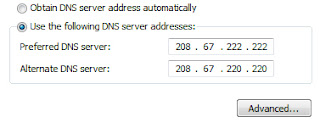
3. Change your DNS servers.
Alternate DNS Server: 208.67.222.220
Updated on 10.06.2010: If you are located in Europe, I would recommend you to use Google’s public DNS servers:
Preferred DNS Server: 8.8.8.8
Alternate DNS Server: 8.8.4.4
5. Little tricks: maybe you can just watch to watch the later part of the video, just drag the play bar to the point you want to start, it will start buffering from there. Or if it still won’t work after all these are done, you may just download the YouTube video for enjoyment. Or check out your internet condition!
Without the boresome waiting and waiting, you can now smooth your YouTube videos playback. Have a try! May there be some other better ones? Leave a comment to let me know. (The 4th method is from: fixexe, thanks)
Premise: your computer should be in a normal condition and well-connected to the network, which means you can watch YouTube videos but maybe with slow loading. 1. YouTube “Feather” beta: it enables YouTube faster speed for video viewing, but just for some videos currently as it is still in progress. As it is intended to serve YouTube video watch pages with the lowest latency possible, it causes severe loss in the features available: expanding share boxes, collapsible comments, and a long list of related videos on the side of the page. And the simplified layout would be: first few comments as fixed text on the page; only offers thumbs up/down, flag buttons; “related videos” shows in 5 items; etc. By reducing the bytes downloaded by the browser, loading time shortens. LOL, the ads are still on.
2. YouTube HTML5 Video Player: most videos’ playback would be realized by HTML5 player instead of flash player if you are using a supported browser (Firefox4, Google Chrome, Opera 10.6+, Safari, IE 6,7,8,9).
- Go Windows Start button, and run Control Panel.
- Click on Network and Sharing Center.
- Select Manage network connections.
- Double click on active internet connection, probably named as Local Area Connection.
- Click Properties.
- Now double click Internet Protocol Version 4 (TCP/IPv4), located in middle form.
- Select Use the following DNS server addressed, and change them to:
Alternate DNS Server: 208.67.222.220
Updated on 10.06.2010: If you are located in Europe, I would recommend you to use Google’s public DNS servers:
Preferred DNS Server: 8.8.8.8
Alternate DNS Server: 8.8.4.4

- Click OK to confirm changes to Open DNS servers.
5. Little tricks: maybe you can just watch to watch the later part of the video, just drag the play bar to the point you want to start, it will start buffering from there. Or if it still won’t work after all these are done, you may just download the YouTube video for enjoyment. Or check out your internet condition!
Without the boresome waiting and waiting, you can now smooth your YouTube videos playback. Have a try! May there be some other better ones? Leave a comment to let me know. (The 4th method is from: fixexe, thanks)
2012/09/25
Observe iPhone 5 in Video Shooting and Video Viewing
Disappointed to many apple fans, iPhone 5 was defined as an evolution rather than an expecting revolution. If you allow me, superficially, the most outstanding new feature goes to the lengthened screen (and the thinnest iPhone). However, when you take a close at the screen, you’ll notice that it may indeed become one of the improved traits.
1. Video Shooting in iPhone
iPhone 5 camera definitely could be regarded as an impressive camera among phones. Compared with the previous iPhones, the iSight camera still remains to be 8-megapixel, but with a new sapphire-crystal lens, enhanced feature in dynamic low-lighting adjustment, image stabilization on the 1080P video camera, and photo shots (screen captures of the video) while shooting video.
With these improved features, shooting videos with iPhone 5 will be nice to experience as shown in the 2 most excellent traits.
As many of us have known that YouTube app is excluded in iPhone 5 as a built-in app, which means even with a half-inch larger screen, the previously built-in YouTube app is no longer available. However there are still various ways to watch videos through YouTube on iPhone 5.
Users can download the YouTube app which is developed by YouTube from app Store. This offers better experience than viewing through browser. Tap the App Store and Select search in which entering “YouTube” to install the YouTube app.
The newly released App by YouTube, (one day earlier before iPhone unveiled), provides with better sharing to social media, channel support, but it lacks uploading function. Besides, the taller screen seems to make the video size unsuitable for there is black boxes above and below on the iPhone 5 4-inch screen.
Another way to watch videos through YouTube on iPhone 5 is through mobile Safari. Visit m.youtube.com for video viewing on iPhone 5, though slower in speed and lower in quality, could be nice after all.
Compatible with both iPhone 5 and iPad, YouTube app Jasmine is the best option for you, and even could be better than what Google was offering until now, which could not go with iPad.
Functions as search/browse for videos, access your playlists, viewing history, favorite videos, and subscriptions can all be realized in this app. What’s more, you can also toggle between night/day mode easily, and control appearance, video playback, and parental controls among many other settings.
The YouTube app by YouTube and the mobile Safari won’t allow uploading/sharing videos to YouTube, but uploading through the built-in Photos app and iMovie app is still available.
With the enhanced camera, you can catch better motion videos of your daily life, edit and then upload through iMovie and watch the videos through YouTube app. After all, from the video point of view, iPhone 5 does get evolved to some extent, or does it?

1. Video Shooting in iPhone
iPhone 5 camera definitely could be regarded as an impressive camera among phones. Compared with the previous iPhones, the iSight camera still remains to be 8-megapixel, but with a new sapphire-crystal lens, enhanced feature in dynamic low-lighting adjustment, image stabilization on the 1080P video camera, and photo shots (screen captures of the video) while shooting video.
With these improved features, shooting videos with iPhone 5 will be nice to experience as shown in the 2 most excellent traits.
- Image stabilization: video clips shot while in moving situations can be impressive instead of jerky and jumpy, which makes video quality terrible. Though not as perfect as dedicated/professional video camera, slower motions are definitely smoothed out.
- Panorama mode at a fast speed: this new feature could be get by freely updating iPhone 4S. Ultra-wide shots by slowly moving the iPhone camera from left to right while in portrait mode, all 360 degrees could be included in your pan. And the faster processing chip in iPhone 5 makes the camera opens 40% quicker and responds swiftly.
As many of us have known that YouTube app is excluded in iPhone 5 as a built-in app, which means even with a half-inch larger screen, the previously built-in YouTube app is no longer available. However there are still various ways to watch videos through YouTube on iPhone 5.

The newly released App by YouTube, (one day earlier before iPhone unveiled), provides with better sharing to social media, channel support, but it lacks uploading function. Besides, the taller screen seems to make the video size unsuitable for there is black boxes above and below on the iPhone 5 4-inch screen.
The YouTube app by YouTube and the mobile Safari won’t allow uploading/sharing videos to YouTube, but uploading through the built-in Photos app and iMovie app is still available.
With the enhanced camera, you can catch better motion videos of your daily life, edit and then upload through iMovie and watch the videos through YouTube app. After all, from the video point of view, iPhone 5 does get evolved to some extent, or does it?
2012/09/23
BBC Media Player for Android Devices
The “fast-changing environment” of mobile development has been well proved by the retreat of Adobe Flash from Android Mobile and the governing of HTML5, and BBC iPlayer’s permission for downloading as well.
Yet,Flash is still the best choice of media format to use, when taken so many factors into consideration: supports JellyBean and as well as earlier Android OS version like Gingerbread and FroYo; goes well with both websites and Android applications.
Thus, the BBC is launching a new media player for its iPlayer streaming app on Android powered devices: phones and tablets. In fact, BBC has supported iPlayer on Android since 2010 till its decision of removing the flash player plugin for Android.

The new media player is named BBC Media Player, which is already available on Google Play. BBC Media Player applies Adobe Flash’s “cousin” Adobe Air for streaming radio and video playback on Android devices.
“We want people to have the best experience possible when they're watching BBC TV programmes or listening to BBC radio programmes. This means, amongst other things, making them available on as many devices as is practical,” said Chris Yanda, executive product manager at BBC Future Media.
Facing the challenges of making services available across Android platforms as well as IOS, many broadcasters are trying to make that possible. BSkyB launched its Sky Go app for Android in January 2012 (8 months after its IOS version.)
Though many give priority to IOS platform, Android OS is quite a promising market as UK smartphone sales share in the 12 weeks to 10 June shows that: Android took 57.2% while iPhone accounted for a much less amount of 25.6.
"No technology is perfect. We've seen some of the challenges that other Adobe Air based apps have had in the marketplace and so we have worked hard, both internally and with our technology partners to build the best application we can," Yanda said.
Yet,Flash is still the best choice of media format to use, when taken so many factors into consideration: supports JellyBean and as well as earlier Android OS version like Gingerbread and FroYo; goes well with both websites and Android applications.
Thus, the BBC is launching a new media player for its iPlayer streaming app on Android powered devices: phones and tablets. In fact, BBC has supported iPlayer on Android since 2010 till its decision of removing the flash player plugin for Android.

The new media player is named BBC Media Player, which is already available on Google Play. BBC Media Player applies Adobe Flash’s “cousin” Adobe Air for streaming radio and video playback on Android devices.
“We want people to have the best experience possible when they're watching BBC TV programmes or listening to BBC radio programmes. This means, amongst other things, making them available on as many devices as is practical,” said Chris Yanda, executive product manager at BBC Future Media.
Facing the challenges of making services available across Android platforms as well as IOS, many broadcasters are trying to make that possible. BSkyB launched its Sky Go app for Android in January 2012 (8 months after its IOS version.)
Though many give priority to IOS platform, Android OS is quite a promising market as UK smartphone sales share in the 12 weeks to 10 June shows that: Android took 57.2% while iPhone accounted for a much less amount of 25.6.
"No technology is perfect. We've seen some of the challenges that other Adobe Air based apps have had in the marketplace and so we have worked hard, both internally and with our technology partners to build the best application we can," Yanda said.
Subscribe to:
Posts (Atom)